The best HOTAS for most PC players is the Thrustmaster T.16000M FCS HOTAS: Hall-effect sensors, 30 buttons and a throttle that suits DCS, Star Citizen and Elite alike. On Xbox, get the T.Flight Hotas One. On PS5, the T.Flight Hotas 5. For Ace Combat 8, its licensed HORI stick.
 Best for PCT.16000M FCS HOTAS
 Best for XboxT.Flight Hotas One
 Best for PS5T.Flight Hotas 5
 CheapestT.Flight Hotas X
HOTAS, joystick or two sticks?
HOTAS means "hands on throttle and stick": a joystick for your right hand and a throttle for your left, both covered in buttons so you never reach for the keyboard. It's how fighter jets are flown, and the best setup for most flight and space games.
- A joystick on its own is enough for casual flying. You'll use the keyboard or a slider for throttle.
- A HOTAS adds a throttle you can grab, with buttons for weapons, flaps or landing gear. Start here.
- Two sticks (HOSAS) suit space games like Star Citizen, where your left hand moves the ship sideways and up and down instead of controlling a throttle.
- Rudder pedals go with any of them. They take over the rudder from the stick's twist, which helps most with landings and helicopters.
Which HOTAS works on PC, Xbox and PS5?
On a PC, nearly every stick works. On a console, a stick has to be made (and licensed) for that console, so check before you buy:
| Stick | PC | Xbox | PS5 | Good for |
|---|---|---|---|---|
| 1T.16000M FCS HOTAS | ✓ Yes | — | — | DCS, Star Citizen, Elite, MSFS, X-Plane |
| 2T.Flight Hotas One | ✓ Yes | ✓ Yes | — | MSFS 2024 on Xbox; any PC sim |
| 3T.Flight Hotas 5 | ✓ Yes | — | ✓ Yes | MSFS 2024 on PS5; any PC sim |
| 4T.Flight Hotas X | ✓ Yes | — | — | Learning on any PC sim |
| 5T.Flight Full Kit | ✓ Yes | ✓ Yes | — | Helicopters, landings, any sim on Xbox or PC |
| 6HORI Ace Combat 8 stick | ✓ Yes | — | ✓ Yes | Ace Combat 8, arcade flight games |
| 7VelocityOne H.O.T.A.S. | ✓ Yes | ✓ Yes | — | MSFS and combat flying on Xbox or PC |
| 8Sol-R4 HOTAS | ✓ Yes | — | — | Elite Dangerous, Star Citizen, space combat |
| 9Sol-R2 HOSAS | ✓ Yes | — | — | Star Citizen, space sims |
| 10HOTAS Warthog MkII | ✓ Yes | — | — | DCS (A-10C, F-16), X-Plane, MSFS |
Every console stick in this guide also works on a PC, so it isn't wasted if you move to PC later. To check a stick, yoke or pedals you already own, plug them into our joystick tester.
The 10 best HOTAS and flight sticks
Ranked by how many people they suit: platform first, then the games they fit and the budget. We don't test hardware ourselves; every spec comes from the maker, and every pick is on sale at Amazon.
Best HOTAS for PC
Thrustmaster T.16000M FCS HOTAS
- PC: works
- Xbox: not supported
- PS5: not supported
The one most PC simmers should start with. The stick reads its main axes with Hall-effect magnetic sensors, the throttle has a mini-stick for space sims, and both work left- or right-handed. It covers DCS, Star Citizen, Elite Dangerous, MSFS and X-Plane without feeling like a toy.
- In the box
- Stick + TWCS throttle
- Controls
- Stick 4 axes, 16 buttons; throttle 5 axes, 14 buttons
- Stick sensors
- Hall effect (pitch and roll)
- Rudder
- Twist grip; pedals plug into the throttle
- Good for
- DCS, Star Citizen, Elite, MSFS, X-Plane
- Budget
- $160 to $180
Pros
- Hall-effect sensors on the stick's pitch and roll
- Ambidextrous stick, for left or right hands
- 30 buttons across stick and throttle, plus a mini-stick
- Rudder pedals plug straight into the throttle
Cons
- PC only: no console support
- Plastic build, and the stick's tension isn't adjustable
Skip it if you play on a console, or want metal replica grips for DCS: see the Warthog MkII.
Check price on AmazonBest HOTAS for Xbox
Thrustmaster T.Flight Hotas One (MSFS 2024 Edition)
- PC: works
- Xbox: works
- PS5: not supported
Officially licensed for Xbox Series X|S and Xbox One, and it works on a PC too. You get a stick, a detachable throttle and two ways to steer the rudder, set up and ready in MSFS 2024. A sound first HOTAS if you play on both.
- In the box
- Stick + detachable throttle
- Controls
- 5 axes, 14 buttons
- Stick sensors
- Not stated by Thrustmaster
- Rudder
- Twist grip or throttle rocker
- Good for
- MSFS 2024 on Xbox; any PC sim
- Budget
- $100 to $120
Pros
- Licensed for Xbox, plug-and-play on PC
- Detachable throttle: desk or lap
- Rudder by twisting the stick or the throttle's rocker
Cons
- Thrustmaster doesn't say which sensors it uses
- 14 buttons: fine for flight sims, thin for DCS jets
Skip it if you only play on PC: the T.16000M FCS HOTAS gives you more for the money.
Check price on AmazonBest HOTAS for PS5
Thrustmaster T.Flight Hotas 5 (MSFS Edition)
- PC: works
- Xbox: not supported
- PS5: works
The HOTAS for PlayStation flyers: licensed for MSFS 2024, it works on PS5, PS4 and PC, and Thrustmaster's 16-bit Hall-effect sensor reads the main axes. Same layout as the Hotas One, so the advice carries over.
- In the box
- Stick + detachable throttle
- Controls
- 5 axes, 14 buttons
- Stick sensors
- Hall effect (main axes)
- Rudder
- Twist grip or throttle lever
- Good for
- MSFS 2024 on PS5; any PC sim
- Budget
- $100 to $120
Pros
- Works on PS5, PS4 and PC
- 16-bit Hall-effect sensor on the main axes
- Detachable throttle and dual rudder control
Cons
- Not for Xbox
- 14 buttons, like the Hotas One
Skip it if you mainly play Ace Combat 8 on PS5: its licensed sticks are made for that game's controls.
Check price on AmazonCheapest HOTAS for PC
Thrustmaster T.Flight Hotas X
- PC: works
- Xbox: not supported
- PS5: not supported
The lowest-cost way to get a stick and a real throttle on a PC. It's an older design, but it does the basics: a detachable throttle, adjustable stick resistance and rudder by twist or rocker. Fine for learning, before you know what you'll fly most.
- In the box
- Stick + detachable throttle
- Controls
- 5 axes, 12 buttons
- Stick sensors
- Not stated by Thrustmaster
- Rudder
- Twist grip or throttle rocker
- Good for
- Learning on any PC sim
- Budget
- $70 to $80
Pros
- Cheapest stick-and-throttle set we'd buy
- Adjustable stick resistance
- Detachable full-size throttle
Cons
- PC only
- Older design; sensors not stated
Skip it if you plan to fly DCS jets or space sims seriously: you'll want more buttons soon.
Check price on AmazonBest kit with rudder pedals
Thrustmaster T.Flight Full Kit (Hall-effect stick, TFRP pedals)
- PC: works
- Xbox: works
- PS5: not supported
A HOTAS and rudder pedals in one box for Xbox and PC, with a Hall-effect stick. Pedals free your hand from twisting the stick and make takeoffs, landings and helicopter flying far easier.
- In the box
- Stick + detachable throttle + rudder pedals
- Controls
- 5 axes, 14 buttons, plus 3 pedal axes
- Stick sensors
- Hall effect (joystick)
- Rudder
- Pedals included
- Good for
- Helicopters, landings, any sim on Xbox or PC
- Budget
- $220 to $240
Pros
- Pedals included (TFRP, on slide rails)
- Hall-effect joystick
- Works on Xbox and PC
Cons
- Not for PS5
- 14 buttons on the HOTAS
Skip it if you play on PS5: add TFRP pedals (PS5 and PC) to the T.Flight Hotas 5 instead.
Check price on AmazonBest for Ace Combat 8
HORI Ace Combat 8: Wings of Theve Flight Stick
- PC: works
- Xbox: not supported
- PS5: works
One of the two sticks officially licensed for Ace Combat 8, with a dedicated High-G button and throttle and brake levers for quick speed changes in a dogfight. It works on PS5, PS4 and PC, and its magnetic sensors have no contacts to wear.
- In the box
- Stick with throttle and brake levers
- Controls
- Throttle and brake levers, High-G button
- Stick sensors
- Magnetic, contactless
- Rudder
- Not stated by HORI
- Good for
- Ace Combat 8, arcade flight games
- Budget
- $120 to $140
Pros
- Licensed by Bandai Namco and Sony for Ace Combat 8
- Magnetic contactless sensors
- Ambidextrous, symmetrical design
Cons
- Built for arcade combat, not civil flight sims
- HORI doesn't list axis or button counts
Skip it if you mostly fly MSFS on PS5: the T.Flight Hotas 5 suits a sim better.
Check price on AmazonMost controls on Xbox
Turtle Beach VelocityOne H.O.T.A.S.
- PC: works
- Xbox: works
- PS5: not supported
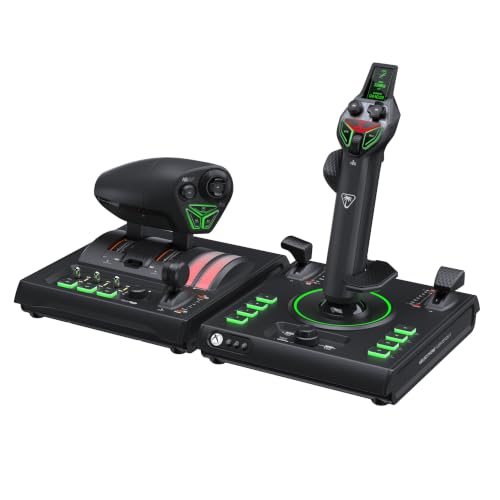
The big step up for Xbox and PC: the Flightstick II and a dual throttle with 73 programmable inputs, 15 axes and a color display for settings. Hall-effect sensors on the stick, a grip that adjusts for either hand, and twist rudder you can lock out once you add pedals.
- In the box
- Flightstick II + dual throttle
- Controls
- 15 axes, 73 programmable inputs
- Stick sensors
- Hall effect, 16-bit
- Rudder
- Twist grip (can be locked)
- Good for
- MSFS and combat flying on Xbox or PC
- Budget
- $270 to $290
Pros
- 73 programmable inputs, 15 axes
- 16-bit Hall-effect stick sensors
- Dual throttle with swappable detents
- Left- or right-handed grip
Cons
- Not for PS5
- Costs well over twice as much as a Hotas One
Skip it if you only fly on PC: the T.16000M FCS HOTAS covers most sims for less.
Check price on AmazonBest for Elite Dangerous
Thrustmaster Sol-R4 HOTAS
- PC: works
- Xbox: not supported
- PS5: not supported
A HOTAS designed for space: 21 buttons on the grip alone, including two triggers, two hats, a mini-stick and a thumbwheel, and 58 across the set. The throttle has a movable detent, and the stick's three axes use Hall-effect sensors. It suits Elite Dangerous, where one hand flies and the other manages thrust.
- In the box
- Stick + throttle
- Controls
- 58 buttons (21 on the grip), mini-stick, thumbwheel
- Stick sensors
- Hall effect, 16-bit (X, Y, twist)
- Rudder
- Twist grip
- Good for
- Elite Dangerous, Star Citizen, space combat
- Budget
- $340 to $360
Pros
- 58 buttons, 21 of them on the grip
- Hall-effect sensors on all three stick axes
- Throttle with a movable detent
Cons
- PC only
- Space-sim layout; overkill for civil flight
Skip it if you play Star Citizen and want two sticks: see the Sol-R2 HOSAS.
Check price on AmazonBest for Star Citizen
Thrustmaster Sol-R2 HOSAS
- PC: works
- Xbox: not supported
- PS5: not supported
Two sticks instead of a stick and throttle, which is how many Star Citizen pilots fly: one hand points the ship, the other strafes. Each stick has 21 buttons, a throttle on its base and Hall-effect sensors on all three axes, 88 buttons in all.
- In the box
- Two sticks, each with a throttle on the base
- Controls
- 88 buttons (21 per grip)
- Stick sensors
- Hall effect, 16-bit (X, Y, twist)
- Rudder
- Twist on each stick
- Good for
- Star Citizen, space sims
- Budget
- $380 to $400
Pros
- Two sticks for six-axis space flight
- 88 buttons, a throttle on each base
- Hall-effect sensors, 16-bit
Cons
- PC only
- No use for planes that need a real throttle lever
Skip it if you also fly jets or airliners: a HOTAS like the Sol-R4 or T.16000M suits both.
Check price on AmazonBest for DCS
Thrustmaster HOTAS Warthog MkII
- PC: works
- Xbox: not supported
- PS5: not supported
Metal replicas of the F-16's VIPER grip (19 buttons) and the A-10C's dual throttle (17 buttons, slew control), on a redesigned metal base with Hall-effect sensors. For DCS pilots who fly those jets and want the real layout. There's no twist, so budget for rudder pedals.
- In the box
- Metal stick (F-16 grip) + A-10C dual throttle
- Controls
- 36 buttons (19 on the grip, 17 on the throttle)
- Stick sensors
- Hall effect, 16-bit
- Rudder
- Needs pedals
- Good for
- DCS (A-10C, F-16), X-Plane, MSFS
- Budget
- About $600
Pros
- Licensed U.S. Air Force replica grip and throttle
- Metal construction, Hall-effect sensors
- Dual throttle for twin-engine jets
Cons
- PC only
- No twist rudder: you need pedals
- Costs several times a T.16000M
Skip it if you're new to combat sims: start with the T.16000M FCS HOTAS and see what you fly.
Check price on Amazon




Buttons go to Amazon, where you’ll see today’s price and stock. As an Amazon Associate we earn from qualifying purchases; it never changes what we recommend. Specs and platforms are the makers’ own; budget bands from Amazon’s prices, checked November 2026. We don’t test hardware ourselves.
The best HOTAS for each game
DCS World
DCS runs on PC and works with any stick. Its modern jets have many switches, so buttons matter more here than in any other sim. The T.16000M FCS HOTAS is the usual start, with 30 buttons and pedals that plug into its throttle. If you fly the A-10C or F-16, the Warthog MkII copies their real grip and throttle. Add rudder pedals either way: you'll want them for taxiing and helicopters.
Star Citizen
Many Star Citizen pilots fly with two sticks (HOSAS): the right one points the ship, the left one strafes and climbs. The Sol-R2 HOSAS is built for exactly that. A HOTAS works too, and suits you better if you also fly jets: the Sol-R4 or the T.16000M FCS HOTAS.
Elite Dangerous
Elite is the classic HOTAS space game. Look for a mini-stick you can bind to the side and vertical thrusters: the T.16000M FCS HOTAS has one on its throttle, the Sol-R4 on its grip. Plenty of buttons help too, since you'll bind landing gear, cargo scoop, boost and more.
War Thunder
War Thunder's simulator battles are where a stick pays off: realistic controls, no mouse aim. On PC, any stick here works. On PS5 or Xbox, a stick has to be licensed for the console (the T.Flight Hotas 5 or Hotas One), and what the game accepts is listed in its controls menu.
Ace Combat 8: Wings of Theve
Two sticks are officially licensed for Ace Combat 8: the HORI Ace Combat 8 Flight Stick (PS5, PS4 and PC), with its own High-G button, and Thrustmaster's T.Flight HOTAS Neo, which comes in separate PlayStation and Xbox editions but isn't sold by Amazon in the US as we write. On PC, Bandai Namco released a flight stick support update in late September after players reported problems setting up their sticks, so update the game before you set one up.
Wardogs
Wardogs (in Steam early access since September 2026, consoles planned for 2028) supports flight sticks for its helicopters, and you can bind a throttle axis to the collective. Any PC HOTAS here does the job; the T.16000M FCS HOTAS or the T.Flight Full Kit with pedals suit helicopters best. Controls can change while the game is in early access.
Microsoft Flight Simulator 2024 and X-Plane 12
Civil flight sims have their own guides, with picks scored for each sim: the best flight sticks for MSFS 2024 (including Xbox and PS5) and the best joysticks for X-Plane 12. Flying airliners and small planes? A yoke may suit you better than a stick.
What to look for in a HOTAS
- Your platform. PC takes anything. Xbox and PS5 need a stick licensed for them.
- Sensors. Hall-effect (magnetic) sensors don't wear the way older potentiometers do, so the stick is less likely to drift over time. Many newer sticks use them on the main axes.
- Rudder. A twist grip is fine to start. Pedals are better, and the T.16000M and Thrustmaster's console HOTAS sets accept Thrustmaster pedals.
- Buttons. Civil flying needs few. DCS jets and space sims need many: 30 or more.
- Your hand. Left-handed? The T.16000M, the VelocityOne Flightstick II, the HORI Ace Combat 8 stick and the Sol-R grips work either way.
- Space on your desk. A stick and a throttle take up both sides of your keyboard. Desk clamps or a chair mount help on a small desk.
Already have a stick?
If it drifts, misses buttons or a game won't see it, run it through our joystick tester before you replace it. It shows every axis and button live and checks for drift and full travel. Building a full setup? The cockpit guide plans the rest.