X-Plane 12
Best Flight Stick for X-Plane 12
12 flight sticks ranked for X-Plane 12 by sensors, throttle and rudder, build quality, platforms and adjustability. Each score comes from the product's published specs.
This page contains affiliate links. As an Amazon Associate we earn from qualifying purchases.
12 flight sticks at a glance
| # | Flight Stick | Score | Price |
|---|---|---|---|
| 1 | VelocityOne H.O.T.A.S. Best overall · Mid-Range · Hall-effect sensors · PC and Xbox | 89.1 /100 | Check price |
| 2 | VelocityOne Flightstick II Budget · Hall-effect sensors · PC and Xbox | 86.8 /100 | Check price |
| 3 | Thrustmaster T.Flight Hotas 5 Budget · Hall-effect sensors · PC and PS5 | 86.5 /100 | Check price |
| 4 | Thrustmaster TCA Captain Pack X Airbus Mid-Range · Hall-effect sensors · PC and Xbox | 86.1 /100 | Check price |
| 5 | Thrustmaster HOTAS Warthog MKII High-End · Hall-effect sensors · PC | 79.5 /100 | Check price |
| 6 | Thrustmaster T.16000M FCS Flight Pack Mid-Range · Hall-effect sensors · PC | 78.6 /100 | Check price |
| 7 | Thrustmaster TCA Officer Pack Airbus Budget · Hall-effect sensors · PC | 78.6 /100 | Check price |
| 8 | Thrustmaster TCA Sidestick Airbus Budget · Hall-effect sensors · PC | 76.3 /100 | Check price |
| 9 | Logitech X52 Pro Budget · Hall-effect sensors · PC | 76.0 /100 | Check price |
| 10 | Thrustmaster T.16000M FCS Best budget · Budget · Hall-effect sensors · PC | 71.1 /100 | Check price |
| 11 | Thrustmaster T.Flight Hotas One Budget · PC and Xbox · 5 axes · 14 buttons | 68.5 /100 | Check price |
| 12 | Thrustmaster T.Flight Hotas X Budget · PC · 5 axes · 12 buttons | 61.0 /100 | Check price |




All Flight Sticks Ranked for X-Plane 12
- #1 Best overall
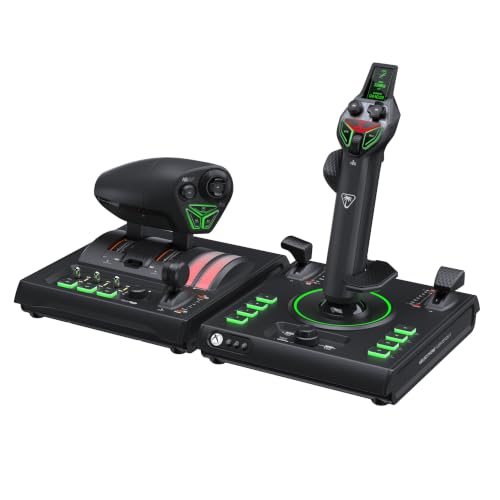
VelocityOne H.O.T.A.S.
- Mid-Range
- Hall-effect sensors
- PC and Xbox
- 15 axes · 73 buttons
89.1 /100 X-Plane 12 scoreThe VelocityOne H.O.T.A.S. suits simmers who want one setup for props, airliners and helicopters in X-Plane 12, with a dual throttle you can set for the climb and leave. The trade-off is a plastic body and a brand-new design with few long-term owner reports.
Strengths and trade-offs
Strengths
- Hall-effect sensors on the main axes read the stick with magnets instead of rubbing contacts, so the center stays put — hold a bank in a long turn or click off the autopilot on short final and the nose doesn't drift on you.
- The throttle is its own unit rather than a lever glued to the stick base, which is rare for what this money usually buys in flight sticks: set climb power on the dual levers, leave it there, and keep both hands free to trim and work the panel.
- With 15 axes, 73 programmable inputs, adjustable spring tension and an ambidextrous grip you can set up left- or right-handed, it stretches from a soft, light feel for hovering a helicopter to firmer centering for a jet, and it still leaves plenty of axes free when you add rudder pedals later.
Trade-offs
- It's brand new (September 2026), so there are no long-term owner reports yet — Turtle Beach's earlier VelocityOne sticks go back to 2022, but with this one you're trusting the spec sheet rather than a few winters of nightly long-haul legs.
- The build is plastic, where the next step up in price is where metal construction starts to appear, and rudder here comes from twisting the grip rather than pedals in the box — fine for coordinating turns, coarser when you're chasing the centerline in a crosswind landing.
- #2
VelocityOne Flightstick II
- Budget
- Hall-effect sensors
- PC and Xbox
- 8 axes · 38 buttons
86.8 /100 X-Plane 12 scoreThe VelocityOne Flightstick II suits X-Plane 12 pilots who want one unit for everything, with throttle levers in the base you can set for the climb and leave. The trade-off is a plastic body and a twist-grip rudder, which is coarser than pedals in a gusty crosswind landing.
Strengths and trade-offs
Strengths
- The main axes use Hall effect sensors — contactless magnetic sensors with nothing rubbing inside — so the center stays put and the nose doesn't drift the moment you click off the autopilot on short final, and you can keep X-Plane 12's null zone (its dead zone setting) small.
- Throttle levers sit in the base, so you can set climb power and leave your hand on the grip while you trim; most alternatives for this money expect you to buy a separate throttle or fly on keyboard keys.
- With 8 axes and 38 programmable inputs you can map flaps, gear, trim and views without reaching for the keyboard, the grip can be set up for the left or right hand, and adjustable spring tension lets you soften it for a light trainer or firm it up for steady airliner hand-flying — then add rudder pedals later and reassign the twist axis in X-Plane.
Trade-offs
- It is brand new (September 2026), so there are very few long-term owner reports on how the plastic body and the springs hold up after months of daily flying — Turtle Beach's earlier VelocityOne sticks have been around since 2022, but this one has no track record yet.
- The next step up in price buys metal construction and a standalone throttle you can place beside the stick; here the body is plastic and the levers live in the base, so your hand comes off the grip to adjust power while you're lining up on the centerline.
- #3
Thrustmaster T.Flight Hotas 5
- Budget
- Hall-effect sensors
- PC and PS5
- 5 axes · 14 buttons
86.5 /100 X-Plane 12 scoreThe Thrustmaster T.Flight Hotas 5 suits simmers moving up from a gamepad to X-Plane 12, with Hall-effect magnetic sensors that keep the center steady on short final. The trade-off is plastic build, a right-handed grip and rudder by twisting the stick rather than pedals.
Strengths and trade-offs
Strengths
- Hall-effect sensors on the main axes read your inputs with magnets instead of rubbing contacts, so the center stays put — hold a bank in a steady turn or fly a long ILS in X-Plane 12 and the nose doesn't creep while your hand is still.
- The throttle is its own unit rather than a small lever bolted to the stick base, which is rare for what this money usually buys — set climb power once and leave it there while you trim and work the radios.
- Five axes, 14 programmable inputs and adjustable spring tension make it a sensible first HOTAS (hands on throttle and stick) for GA touring or an airliner climb, and X-Plane 12 lets you map every one of them and add rudder pedals later without replacing the stick.
Trade-offs
- Rudder comes from twisting the grip, which is fine in the cruise but awkward on a gusty crosswind landing — pulling back into the flare can add a little twist you didn't ask for, and long taxi turns mean holding the grip over.
- The body is plastic and the grip is right-handed only, so left-handers, and anyone who wants a sturdier gimbal or a throttle with a detent (a notch you can feel for idle or reverse), will need to look at the next step up in price.
- #4
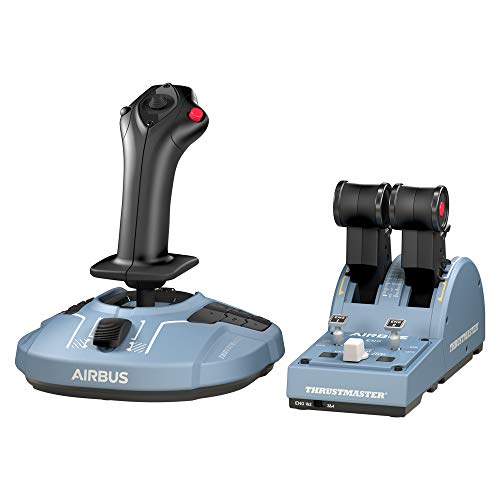
Thrustmaster TCA Captain Pack X Airbus
- Mid-Range
- Hall-effect sensors
- PC and Xbox
- 8 axes · 45 buttons
86.1 /100 X-Plane 12 scoreThe Thrustmaster TCA Captain Pack X Airbus suits X-Plane 12 simmers flying airliners, since the separate throttle quadrant lets you set climb thrust and leave it while you trim. The trade-off is rudder by twisting the stick and fixed spring tension you can't adjust.
Strengths and trade-offs
Strengths
- Hall-effect sensors on the main axes read the stick with magnets instead of rubbing contacts, so the center stays put and the nose doesn't wander when you click off the autopilot on short final.
- You get a real throttle unit rather than a small lever stuck on the stick base, which is rare for what this money usually buys — set climb thrust on the quadrant and leave it there while you watch the speed tape.
- It's a 1:1 Airbus A320 sidestick replica with 8 axes and 45 programmable inputs, so an Airbus fan can map gear, flaps, autopilot modes and lights without reaching for the keyboard, and the ambidextrous grip means you can run it on the captain's left-hand side.
Trade-offs
- Rudder comes from twisting the grip, and twisting a stick while holding a bank is fiddly, so a gusty crosswind landing or a tight taxiway turn in X-Plane 12 takes practice until you add pedals.
- Spring tension is fixed and the body is plastic, so you can't soften or firm up the centering force for long hand-flown legs — the next step up in price is where you find adjustable tension and metal construction.
- #5
Thrustmaster HOTAS Warthog MKII
- High-End
- Hall-effect sensors
- PC
- 36 buttons
79.5 /100 X-Plane 12 scoreThe Thrustmaster HOTAS Warthog MKII suits X-Plane 12 simmers flying military jets, with Hall-effect contactless sensors on the main axes that hold center when you roll out on the centerline. There's no twist rudder, so you'll need pedals, and the metal set is right-handed and heavy.
Strengths and trade-offs
Strengths
- Hall-effect sensors (contactless magnetic sensors, so nothing rubs as the stick moves) keep the center steady, so the nose doesn't drift when you click off the autopilot and hand-fly the last mile to the runway.
- It comes with its own dual throttle unit, so you can set climb power and leave it there while you trim and watch the speed tape — at this price point most alternatives give you a small lever on the stick base instead of a separate metal throttle.
- With 36 programmable inputs and swappable grips, it fits simmers who fly fast jets and want flaps, speedbrake, trim and view changes under their thumbs; add rudder pedals and you have a full setup that grows with you.
Trade-offs
- There's no twist rudder, so taxiing the centerline and holding a crosswind landing straight both need rudder pedals — budget for a set, and remember the metal pair weighs about 6.5 kg (14 lb) together, so it wants a solid desk or proper mounts.
- Spring tension is fixed and the grip is right-handed only, so you can't soften the springs for a long hand-flown cruise or firm them up for close formation.
- #6
Thrustmaster T.16000M FCS Flight Pack
- Mid-Range
- Hall-effect sensors
- PC
- Pedals included
78.6 /100 X-Plane 12 scoreThe Thrustmaster T.16000M FCS Flight Pack suits simmers moving up from a gamepad in X-Plane 12, with rudder pedals in the box so your feet hold the centerline on landing. The build is plastic with fixed spring tension, and it is PC only, so no Xbox or PS5.
Strengths and trade-offs
Strengths
- The main axes use Hall effect sensors, meaning contactless magnetic sensing with no scraping parts, so the center stays steady and the nose doesn't drift when you click off the autopilot on short final in X-Plane 12.
- At this price point most sets stop at a stick, or a stick and a throttle; this one puts the TFRP rudder pedals in the box too, so you can push a boot in to hold the centerline on a crosswind landing while your hands stay on the stick and power.
- The separate throttle unit means you can set climb power and leave it while you trim out a long GA cruise, and the ambidextrous grip can be set up for the left or right hand, which helps if you want the stick on your left and the throttle on your right.
Trade-offs
- It is a PC-only set, and no adapter changes that, so if you also fly a sim on Xbox or PS5 you would need a second stick; X-Plane 12 itself is not on consoles, so this only matters outside the sim.
- Spring tension is fixed and the build is plastic, so you cannot dial in a heavier center feel for a long helicopter hover; the next step up in price is where you find adjustable tension and metal construction.
- #7
Thrustmaster TCA Officer Pack Airbus
- Budget
- Hall-effect sensors
- PC
- 6 axes · 28 buttons
78.6 /100 X-Plane 12 scoreThe Thrustmaster TCA Officer Pack Airbus suits X-Plane 12 simmers flying the A320, pairing a 1:1 sidestick replica with its own throttle quadrant you can set for the climb and leave. The trade-off is plastic build, fixed spring tension and PC-only support.
Strengths and trade-offs
Strengths
- The main axes use Hall effect sensors — contactless magnets instead of rubbing parts — so the center stays put and the nose doesn't drift when you click off the autopilot and hand-fly the last part of an approach.
- A lot of sticks for this money give you a tiny lever on the base and call it a throttle; here you get a separate Airbus-style throttle quadrant, so you can set climb thrust, leave it, and keep both hands where they belong during a busy departure.
- With 6 axes, 28 programmable inputs and an ambidextrous grip you can mount on the left like the real A320 seat, it fits simmers who live in airliners and want flaps, speedbrake, gear and views on the hardware — and it still has room to grow when you add rudder pedals later.
Trade-offs
- It is PC only: it won't work on Xbox or PS5, even with an adapter, so if you also sim away from the desktop this can't travel with you — for X-Plane 12 itself that's moot, since the sim is PC and Mac only.
- Spring tension is fixed and the body is plastic, so you can't firm up the center for a hand-flown crosswind landing or soften it for a long cruise leg; the next step up in price is where you find adjustable tension and metal construction.
- #8
Thrustmaster TCA Sidestick Airbus
- Budget
- Hall-effect sensors
- PC
- 4 axes · 17 buttons
76.3 /100 X-Plane 12 scoreThe Thrustmaster TCA Sidestick Airbus suits X-Plane 12 pilots who want an A320 sidestick on the desk, with a throttle lever built into the base so you can set climb power and leave it. The trade-off: the lever sits on the base rather than a separate quadrant, and it's PC only, so no Xbox or PS5.
Strengths and trade-offs
Strengths
- Hall-effect sensors on the main axes read your inputs with magnets instead of rubbing contacts, so the stick sits still at center — hold a bank in a long turn or hand-fly short final and the nose stays where you put it instead of drifting.
- The throttle lever lives on the stick base, so you can set climb thrust and leave it there while you trim and watch the speed; at this price a lot of sticks give you the stick and nothing else, and you also get 4 axes and 17 programmable inputs for flaps, gear, trim and views.
- A good fit for the Airbus flyer who wants the 1:1 licensed sidestick shape under the right hand, and the ambidextrous grip means left-handers can set it up on the other side; it still leaves room to add rudder pedals or a separate quadrant later as your setup grows.
Trade-offs
- The throttle is an axis on the base, not a lever quadrant with detents — the notches you feel for climb and takeoff thrust — so in an X-Plane 12 Airbus departure you're setting power by watching the display rather than clicking into a gate.
- Spring tension is fixed and the body is plastic, so you can't soften or stiffen the centering for helicopter work; the next step up in price, with a separate quadrant, is where you get a real lever quadrant with detents.
- #9
Logitech X52 Pro
- Budget
- Hall-effect sensors
- PC
76.0 /100 X-Plane 12 scoreThe Logitech X52 Pro suits PC simmers who want a full stick and throttle for X-Plane 12, with Hall-effect contactless sensors that hold center when you click off the autopilot on short final. The trade-off: PC only, plastic build, and the stick's spring tension is fixed.
Strengths and trade-offs
Strengths
- Hall-effect sensors are contactless magnetic sensors with no scraping parts, so the center stays put and the nose doesn't wander when you hand-fly a long turn or level off at the top of a climb in X-Plane 12.
- It comes with its own throttle unit rather than a lever bolted to the stick base, so you can set climb power and leave it there while you trim and work the panel — most of what this money buys gives you a stick alone.
- The right-handed grip and generous button count suit GA and airliner flying where you want views, flaps, gear and trim under your thumb, and it grows later when you add rudder pedals such as the TFRP and assign them per-axis in X-Plane.
Trade-offs
- The stick's spring tension can't be adjusted (only the throttle's), and it's a plastic 2007 design, so the center feel is what it is when you're holding a wing down through a gusty crosswind landing.
- Step up in price and you get adjustable stick tension, metal construction and often rudder pedals in the box; here the rudder is a twist of the grip, which is harder to hold steady on the centerline than feet on pedals.
- #10 Best budget
Thrustmaster T.16000M FCS
- Budget
- Hall-effect sensors
- PC
- 4 axes · 16 buttons
71.1 /100 X-Plane 12 scoreThe Thrustmaster T.16000M FCS suits anyone moving off a gamepad in X-Plane 12: Hall-effect magnetic sensors hold the center, so the nose stays put when you level off. The trade-off is a small throttle slider on the base, no rudder pedals, and PC only.
Strengths and trade-offs
Strengths
- Hall effect means the sensors read your inputs with magnets instead of rubbing contacts, so the stick keeps a true center — hold a steady bank in a turn or click off the autopilot on short final and the nose doesn't creep on its own.
- At this price most sticks use wearing contact sensors and give you a handful of buttons; this one pairs contactless magnetic sensors with 4 axes and 16 programmable inputs, so flaps, trim and your view hat sit under your thumb instead of on the keyboard.
- The ambidextrous grip sets up for either hand, and the twist grip gives you rudder from day one, which makes it a tidy first stick for light GA flying in X-Plane 12 — add rudder pedals and a throttle quadrant later and the stick still earns its place.
Trade-offs
- The throttle is a small slider on the base, so setting climb power and leaving it alone while you trim is fiddly — a separate throttle you can set and forget feels far closer to the real thing on a long climb.
- Spring tension is fixed and the body is plastic, so you can't soften or stiffen the centering force the way the next step up in price allows, and that step usually brings a separate throttle with a detent — a notch you can feel for idle or reverse — which this doesn't have.
- #11
Thrustmaster T.Flight Hotas One
- Budget
- PC and Xbox
- 5 axes · 14 buttons
68.5 /100 X-Plane 12 scoreThe Thrustmaster T.Flight Hotas One suits a first move off the gamepad in X-Plane 12, with a detachable throttle you can set for the climb and leave. Thrustmaster doesn't claim contactless Hall-effect sensors, so the center may drift after long sessions and need a quick recalibration.
Strengths and trade-offs
Strengths
- It has its own throttle unit, so you can set climb power once and leave it there while both hands work the stick and trim, instead of feathering a gamepad trigger all the way up to cruise.
- For the money, most of what else is out there is a stick on its own — this one bundles a stick, a detachable throttle and a twist-grip rudder (you twist the stick to swing the nose), giving X-Plane 5 axes and 14 programmable inputs for flaps, gear, trim and views.
- Spring tension is adjustable, so you can soften the center for long, gentle banks in a light single or firm it up for a steadier approach; because X-Plane lets you assign any axis, you can add rudder pedals later and move yaw off the twist.
Trade-offs
- Thrustmaster doesn't state contactless Hall-effect sensors (magnets instead of sliding contacts), so after a lot of hours the axes can get jittery or sit off center; in X-Plane you'd recalibrate or set a small null zone (a dead zone, where tiny movements near center are ignored) so the nose holds still when you click off the autopilot on short final.
- The next step up in price buys sturdier parts, separate rudder pedals and modular grip options; here the body is plastic, the rudder is a twist of the stick — harder to hold steady while you flare in a crosswind — and the grip is right-handed only.
- #12
Thrustmaster T.Flight Hotas X
- Budget
- PC
- 5 axes · 12 buttons
61.0 /100 X-Plane 12 scoreThe Thrustmaster T.Flight Hotas X suits simmers moving up from a gamepad in X-Plane 12, with its own throttle unit you can set for the climb and leave while you trim. The trade-offs: plastic build, no stated sensor type, and it's PC only.
Strengths and trade-offs
Strengths
- The detachable throttle gives you a real HOTAS setup, meaning hands on throttle and stick: you can push up climb power in a Cessna or an airliner, leave it there, and keep your right hand on the stick for the whole departure.
- Twisting the grip works the rudder, so you can kick in a boot of rudder to straighten up on a crosswind landing without owning pedals yet — for the money, very few sticks hand you pitch, roll, throttle and rudder in one box.
- With 5 axes and 12 programmable inputs, and X-Plane letting you assign any axis or button, it covers trim, flaps, views and gear on a light single, and it still earns a spot if you add TFRP rudder pedals later.
Trade-offs
- Thrustmaster never says the main axes use contactless Hall-effect sensors, the kind that don't wear, so after a lot of hours the stick can get jittery or drift and the nose may wander when you click off the autopilot on short final; a recalibration or a small null zone in X-Plane usually settles it.
- The next step up in price buys contactless Hall-effect sensors and sturdier parts; here everything is plastic, the grip is right-handed only, and the twist rudder will never be as fine as pedals when you're holding the centerline in gusty conditions.




Frequently Asked Questions
What is the best flight stick for X-Plane 12?
Turtle Beach VelocityOne H.O.T.A.S. (Flightstick II + Dual Throttle) leads with a score of 89/100, making it the top pick for 2026.
How much should I spend on a flight stick for X-Plane 12?
The lowest-priced pick we rank is the Thrustmaster T.16000M FCS (71/100). From the VelocityOne Flightstick II (87/100) upward you get a better balance of build quality and features. Prices change daily, so check the current price with each Amazon button.
Does X-Plane 12 support flight sticks?
Yes — X-Plane 12 natively supports flight sticks. Turtle Beach VelocityOne H.O.T.A.S. (Flightstick II + Dual Throttle) is our top-rated option with a score of 89/100.
What should I look for in a flight stick for X-Plane 12?
Prioritize Sensors (30% of scoring) and Throttle and rudder (25%) when choosing flight sticks for flight simulation. These factors have the greatest impact on feel and immersion in X-Plane 12.
Own any of these?
Rate it in one tap. We research the specs; owners know how the gear holds up.
Also Essential for X-Plane 12
Head-to-Head Comparisons
Further Reading
- The Best Flight Simulators in 2026, RankedThe 8 best flight simulators of 2026, ranked: MSFS 2024, X-Plane 12, DCS World and the best free sims, with what each costs, runs on and needs.
- How to Build a Home Flight Simulator Cockpit: The Complete 2026 GuideEverything a beginner needs to build a home flight simulator: the sim, PC or console, controls, screens, VR and seats, plus three complete setups to copy.
- How to Use the Google Earth Flight Simulator (Web and Earth Pro)Google Earth's free flight simulator now runs in your browser, too. How to open it on the web or in Earth Pro, every control for PC and Mac, and how to land.
- History of Microsoft Flight Simulator: Every Version, 1982–2024Microsoft Flight Simulator came out in 1982, three years before Windows. Every version since, the 40th Anniversary Edition, and what each one needed to run.
- Which Controllers Work With Microsoft Flight Simulator on PC, Xbox and PS5?Check any joystick, yoke or pedals for MSFS 2024 on PC, Xbox or PS5 in seconds. See what works, what needs a hub, and our best picks for each platform.
- X-Plane 12 vs Microsoft Flight Simulator 2024: Which Should You Buy?X-Plane 12 vs Microsoft Flight Simulator 2024 (and 2020): flight model, scenery, VR, PC needs and price compared, with a quick quiz to pick yours.
How We Score Flight Sticks for X-Plane 12
Score formula
sensors × 30% + throttle and rudder × 25% + build quality × 15% + platforms × 15% + adjustability × 15%. Ratings come from each product's published specs, and the same formula is applied to every product. Tiers (Budget, Mid-Range, High-End) describe price, not quality. Full methodology · How we research
Comments
Flying with one of these flight sticks, or still deciding? Ask a question, share your setup or leave a tip. It helps the next simmer choose.
That didn't send. Check your connection and try again.