Buyer's guide · Microsoft Flight Simulator 2024
Best Flight Sim Yokes for Microsoft Flight Simulator 2024
Short answer
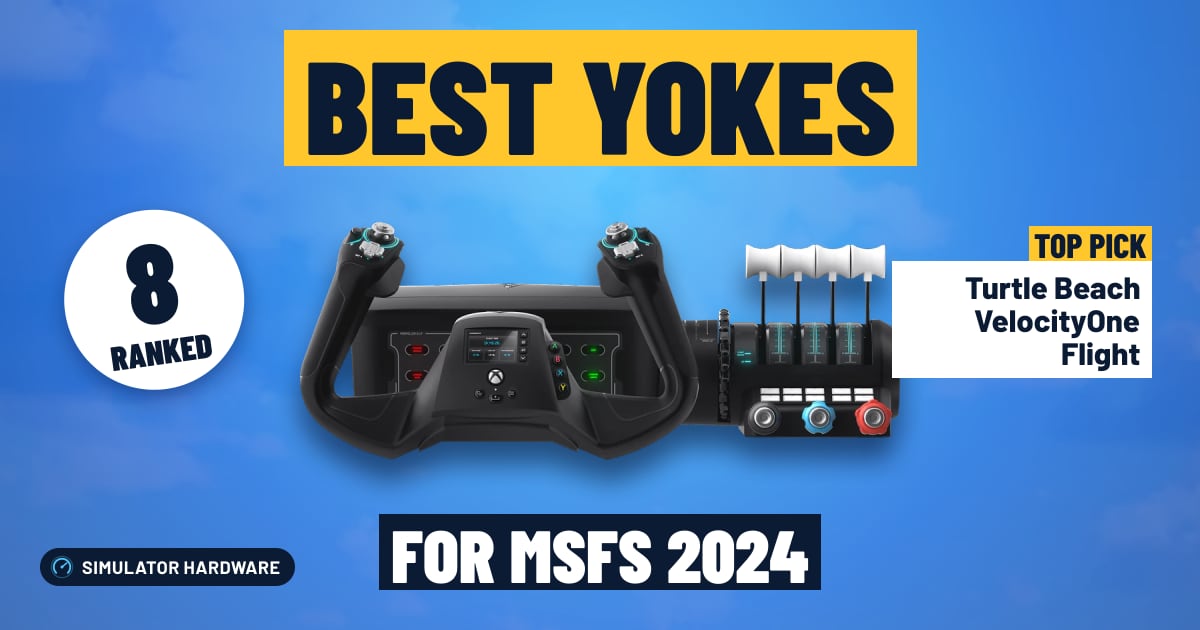
For most simmers: the Turtle Beach VelocityOne Flight, with throttle, trim and rudder controls built in, plus a display and Hall-effect sensors. Small planes on PC: the Honeycomb Alpha. On a console: the Thrustmaster TCA Sky Yoke, in its Xbox or PS5 version. Tight budget: the Honeycomb Alpha LITE.
This page contains affiliate links. As an Amazon Associate we earn from qualifying purchases.
Our three picks
-
Best value · for most simmers
Turtle Beach VelocityOne Flight
- $200–400
- Best for All-in-one setups
Most of what the top pick does for a lot less that Amazon can ship now: throttle, trim and rudder controls built in, plus a display and Hall-effect sensors, on PC and Xbox.
MSFS 2024 score: 78.8/100
-
Best overall
Thrustmaster TCA Yoke Pack Boeing
- $200–400
- Best for Boeing airliners
The highest-scoring yoke here: its own throttle quadrant with an autopilot panel, adjustable springs and Hall-effect sensors, on PC and Xbox.
MSFS 2024 score: 89.8/100
-
Best budget
Honeycomb Alpha LITE
- Under $200
- Best for Small budgets
The least expensive yoke here: no throttle in the box.
MSFS 2024 score: 46.0/100


Pick by how you fly
Console simmer, Boeing captain or Cessna pilot? Start here.
-
Best for PS5
The first yoke that works with MSFS 2024 on PS5: throttle, trim and rudder controls built in, damped centering and Hall-effect sensors. Works on PC too; buy this PS5 version, not the Xbox one.
Amazon isn't shipping it right now; the button shows when it will.
-
Best for small planes
Smooth, damped yoke with the master, avionics and light switches and an ignition key of a Cessna; add a throttle quadrant when you are ready.
-
Best for Xbox
The least expensive yoke for Xbox Series X|S here: throttle, trim and rudder controls built in, damped centering and Hall-effect sensors. Works on PC too.
Amazon isn't shipping it right now; the button shows when it will.


All 8 flight yokes side by side
| Yoke | Works on | In the box | Sensors | Feel | Best for | Score | Price |
|---|---|---|---|---|---|---|---|
| 1 Thrustmaster TCA Yoke Pack Boeing Best overall · $200–400 | PC · Xbox | Yoke + throttle quadrant an autopilot panel | Hall effect contactless, no drift | Adjustable springs 21 cm pitch travel | Boeing airliners | 89.8 | Check price |
| 2 Thrustmaster TCA Sky Yoke (PS5) Under $200 | PC · PS5 | Yoke with throttle trim wheel and rudder controls | Hall effect contactless, no drift | Damped centering 9 cm pitch travel | PS5 | 88.0 | Check stock |
| 3 Thrustmaster TCA Sky Yoke (Xbox) Under $200 | PC · Xbox | Yoke with throttle trim wheel and rudder controls | Hall effect contactless, no drift | Damped centering 9 cm pitch travel | Beginners | 88.0 | Check stock |
| 4 Turtle Beach VelocityOne Flight Best value · $200–400 | PC · Xbox | Yoke with built-in quadrant trim wheel, rudder controls and a display | Hall effect contactless, no drift | Spring centering | All-in-one setups | 78.8 | Check price |
| 5 Honeycomb Alpha + Bravo bundle Over $400 | PC only | Yoke + throttle quadrant trim wheel and a switch panel | Sensors not stated no Hall-effect claim | Damped centering metal internals | GA home cockpit | 72.3 | Check price |
| 6 Logitech G Pro Flight Yoke Under $200 | PC only | Yoke + throttle quadrant | Sensors not stated no Hall-effect claim | Spring centering metal internals | Yoke and throttle | 58.5 | Check price |
| 7 Honeycomb Alpha $200–400 | PC only | Yoke only a switch panel | Sensors not stated no Hall-effect claim | Damped centering metal internals | Small planes | 54.8 | Check price |
| 8 Honeycomb Alpha LITE Best budget · Under $200 | PC only | Yoke only | Sensors not stated no Hall-effect claim | Spring centering metal internals | Small budgets | 46.0 | Check price |


Find your yoke
Question 1 of 4
The 8 best flight yokes for MSFS 2024, ranked
- #1 Best overall
Thrustmaster TCA Yoke Pack Boeing
- $200–400
- PC · Xbox
- Yoke + throttle quadrant
89.8 /100 MSFS 2024 scoreBest for: flying Boeing jets with a 787-style yoke and a Boeing throttle quadrant, on Xbox or PC
The Thrustmaster TCA Yoke Pack Boeing suits simmers flying Boeing jets in MSFS, with its own throttle quadrant in the box and 21 cm of pitch travel for fine control on an approach. It's heavy, there's no trim wheel, and rudder still needs separate pedals.
Watch out for
- Big and heavy: Thrustmaster lists the yoke at 6.7 kg (14.8 lb) and 38 cm (15 in) tall, so it needs a solid desk edge. Reviewers also note the flap lever has no detents.
Strengths and trade-offs
Strengths
- 21 cm of pitch travel on a pendular (hanging) mechanism means a long pull between nose-up and nose-down, so the half-inch of back pressure that holds the nose on the glideslope is a real movement, not a twitch; the Hall-effect sensors (contactless magnets instead of rubbing parts) keep that input steady over time.
- The Boeing-style throttle quadrant is in the box, and it carries autopilot controls for altitude, speed and heading, so you can dial in a new level-off on a departure without taking a hand off the yoke to find a keyboard key; across both parts there are 35 programmable inputs for gear, flaps, lights and views.
- A good fit if you mostly fly the big Boeing jets and want a matching 787-style yoke on Xbox or PC, and it grows with you: add Thrustmaster TFRP pedals for rudder, and set the adjustable spring tension heavier once you want more resistance in hand-flown turns.
Trade-offs
- It's a big unit: Thrustmaster lists 6.7 kg (14.8 lb) and 38 cm (15 in) tall, so a thin or flexing desk edge will wobble when you haul the nose up at rotation, and reviewers note the flap lever has no detents (no notches you can feel), so you watch the screen rather than feel flaps 5 going in on the climb.
- There's no trim wheel to roll with your thumb, so taking the pressure off the yoke in a climb means holding a trim button or key instead, and rudder controls aren't built in at all — taxiing straight and squaring up in a crosswind landing needs pedals bought separately.
- #2
Thrustmaster TCA Sky Yoke (PS5)
- Under $200
- PC · PS5
- Yoke with throttle
88.0 /100 MSFS 2024 scoreBest for: MSFS 2024 on PS5 (and PC), with throttle, trim and rudder controls built in
The Thrustmaster TCA Sky Yoke (PS5) is the one yoke MSFS 2024 supports on PS5, and its built-in trim wheel lets you roll off the pressure on the yoke in the climb. It's brand new with no owner reviews yet, and the PS5 and Xbox versions don't swap.
Watch out for
- Brand new: it ships October 28, 2026, so there are no owner reviews yet. The Xbox and PS5 versions don't swap, so buy the one for your console (both work on PC).
Amazon isn't shipping this one right now; the button shows when it will.
Strengths and trade-offs
Strengths
- Throttle, trim and rudder controls all sit on the one unit, so you can set climb power, roll the trim wheel to take the load off your arm after rotating, and keep the nose straight on the centerline without reaching for a keyboard.
- The main axes use Hall effect sensors, meaning contactless magnets instead of parts that rub and wear, and the centering is damped rather than snappy, so the small pitch nudges on short final settle back to center without jumping past where you wanted them.
- With 9 cm of pitch travel, 180 degrees of roll and a metal shaft, it suits someone holding altitude in a Cessna or hand-flying a 737 approach, and 24 programmable inputs across 7 axes cover gear, flaps and views; Thrustmaster TFRP pedals plug in later if you want proper feet on the rudder.
Trade-offs
- It ships October 28, 2026, so no one has lived with it through a long MSFS session yet, and the Xbox and PS5 versions are not interchangeable, so order the PS5 one if that's your console.
- The throttle is built into the yoke body rather than a separate quadrant you can slide where you like, so you don't get the row of levers that a standalone quadrant gives you for throttle, prop and mixture on a twin.
- #3
Thrustmaster TCA Sky Yoke (Xbox)
- Under $200
- PC · Xbox
- Yoke with throttle
88.0 /100 MSFS 2024 scoreBest for: a first yoke with throttle, trim and rudder controls built in, so one box gets you flying on Xbox or PC
The Thrustmaster TCA Sky Yoke (Xbox) suits a first yoke buyer who wants one box: throttle, trim wheel and rudder controls are built in, so you can rotate, trim the climb and keep straight without extra gear. It's brand new with no owner reviews yet, and the Xbox version won't work on PS5.
Watch out for
- Brand new: it ships October 28, 2026, so there are no owner reviews yet. The Xbox and PS5 versions don't swap, so buy the one for your console (both work on PC).
Amazon isn't shipping this one right now; the button shows when it will.
Strengths and trade-offs
Strengths
- Hall-effect sensors (contactless magnets, so nothing rubs inside the axis) read pitch and roll, and the centering is damped self-centering rather than a hard snap, so the small pitch corrections you make on short final settle instead of overshooting the aim point.
- Throttle, a trim wheel and rudder controls all sit on the unit, so after rotating you can roll in nose-up trim to take the pressure off the yoke and keep the nose on the centerline without reaching for a keyboard; 24 programmable inputs across 7 axes leave room for gear, flaps and lights too.
- It fits a simmer moving up from a gamepad or joystick who flies Cessnas and the odd 737 approach: 9 cm of pitch travel and 180 degrees of roll give you room to work a crosswind landing, and Thrustmaster TFRP pedals plug into Thrustmaster console yokes later if you want rudder underfoot.
Trade-offs
- It ships October 28, 2026, so there are no owner reviews yet and you're judging a hybrid build with a steel shaft on the spec sheet alone; there's also no cross-shopping between consoles, since the Xbox version won't run on a PS5 (both work on PC).
- The throttle is built into the yoke rather than being a separate quadrant, so flying a twin you don't get an independent lever per engine for an engine-out drill; the next step up in price is where you find a standalone quadrant with multiple levers and a dedicated switch panel.
- #4 Best value
Turtle Beach VelocityOne Flight
- $200–400
- PC · Xbox
- Yoke with built-in quadrant
78.8 /100 MSFS 2024 scoreBest for: a yoke, throttle quadrant, trim wheel and rudder controls in one unit, on Xbox or PC
The Turtle Beach VelocityOne Flight suits simmers who want one box that does it all: yoke, two throttle levers, a trim wheel and rudder controls built in. It's one wide unit, about 50 cm across, and some owners say it feels sticky around center at first.
Watch out for
- Some owners say the yoke feels a little sticky around center at first and that quality varies between units. It's one wide unit, about 50 cm (19.5 in) across, so measure your desk.
Strengths and trade-offs
Strengths
- Everything a Cessna circuit needs sits in one unit: two throttle levers to set climb power, a trim wheel you roll to take the pressure off the yoke once you're climbing, and rudder controls built in so you can hold the centerline on the takeoff roll without buying pedals first.
- The main yoke axis uses a Hall-effect sensor, which reads movement with a magnet instead of a wiper rubbing a track, so the small corrections you make holding altitude in a Cessna stay consistent and no worn-out patch builds up in the middle over time.
- With 180 degrees of roll you get a proper hand-over-hand turn instead of a short twist, 12 axes to assign, and a built-in color display and status lights on the panel; it fits a simmer on Xbox or PC who wants one purchase now and can add VelocityOne Rudder pedals later.
Trade-offs
- The maker lists centering springs and says nothing about damping, and several owners report a sticky feeling right around center plus some variation between units, which is exactly where you don't want it when you're nudging pitch a few degrees on short final.
- The body is plastic and the throttle levers are fixed into the yoke unit, so you can't slide a quadrant over to your other hand or swap in more levers the way a separate quadrant allows; the next step up in price is where you'd look for metal internals and a standalone quadrant, and this one is wide at about 50 cm (19.5 in), so measure your desk.
- #5
Honeycomb Alpha + Bravo bundle
- Over $400
- PC
- Yoke + throttle quadrant
72.3 /100 MSFS 2024 scoreBest for: a small-plane cockpit on your desk: yoke, switch panel and a throttle quadrant with autopilot, gear and flaps
The Honeycomb Alpha + Bravo bundle suits PC simmers who want the Cessna cockpit laid out in front of them: a trim wheel, a switch panel and six throttle levers. Honeycomb doesn't state contactless sensors on the main axes, and it's PC only, with no rudder control built in.
Watch out for
- Honeycomb Aeronautical doesn't say this yoke uses contactless (Hall-effect) sensors. Yokes without them can get jittery with age; a calibration or a small dead zone usually fixes it.
- Owners often find the pitch springs stiff at first; they loosen with use.
Strengths and trade-offs
Strengths
- The six throttle levers in the included quadrant let you set power, prop and mixture by hand on a go-around, instead of hunting for keyboard keys while you're trying to hold the centerline.
- Damped self-centering means the yoke eases back to center rather than snapping, so the small pitch nudges you make on short final settle instead of overshooting, and the metal shaft takes the pull without flexing.
- It's built for general aviation flying: the trim wheel rolls off the pressure in the climb so you can let go of the yoke, and the switch panel with master, alternator, avionics, lights and a 5-position ignition key lets you start and shut down a single the way the checklist reads. Add rudder pedals later and the GA cockpit is complete.
Trade-offs
- Honeycomb doesn't say the main axes use contactless (Hall-effect) sensors, and yokes without them can get twitchy around center as they age; recalibrating or setting a small dead zone in MSFS — a tiny band around center where tiny inputs are ignored — usually settles it. Owners also report the pitch springs feel stiff for the first few flights before they loosen up.
- There's no rudder control in the bundle, so taxiing and crosswind landings still need pedals or keys, and it's PC only — no Xbox or PS5 support. Spending more on a yoke can buy contactless sensors, longer pitch travel and more metal inside; the 180 degrees of roll here is plenty for a Cessna but it's a hybrid build, not an all-metal one.
- #6
Logitech G Pro Flight Yoke
- Under $200
- PC
- Yoke + throttle quadrant
58.5 /100 MSFS 2024 scoreBest for: a yoke and a throttle quadrant in one box at a low price, on PC
The Logitech G Pro Flight Yoke suits PC simmers moving up from a gamepad who want a yoke plus a 3-lever throttle quadrant in one box, so you can set power by hand for the climb. Logitech doesn't say it uses contactless Hall-effect sensors, and there's no trim wheel or rudder axis.
Watch out for
- Logitech doesn't say this yoke uses contactless (Hall-effect) sensors. Yokes without them can get jittery with age; a calibration or a small dead zone usually fixes it.
- An older design: owners often mention a slight notch around center on the pitch axis. A small dead zone hides it.
Strengths and trade-offs
Strengths
- The throttle quadrant in the box gives you three levers, so you can push power up for takeoff, pull it back abeam the numbers and set mixture on a Cessna without hunting for a keyboard key.
- There are 25 programmable inputs across the yoke and quadrant, enough to put gear, flaps, lights and autopilot disconnect under your fingers while you're hand-flying a 737 approach.
- With 180 degrees of roll and a steel shaft in the column, it fits light singles and airliners alike, and it grows sensibly later: add rudder pedals and you can taxi with your feet and kick out the drift in a crosswind landing.
Trade-offs
- It's an older design and owners often mention a slight notch right around center on the pitch axis, which can make tiny nose-down corrections on short final feel like they catch before they move; a small dead zone in MSFS (a sliver of travel where the sim ignores the yoke) hides most of it.
- Logitech doesn't state contactless Hall-effect sensors, the kind that read position without parts rubbing, so an older unit can get jittery and need a recalibration — and there's no trim wheel here, so you trim with buttons instead of rolling off the pressure by hand in the climb. The next step up in price can buy contactless sensors, a trim wheel and longer pitch travel.
- #7
Honeycomb Alpha
- $200–400
- PC
- Yoke only
54.8 /100 MSFS 2024 scoreBest for: Cessnas and Bonanzas on PC, with the switch panel and ignition key; add a throttle quadrant later
The Honeycomb Alpha suits Cessna and Bonanza pilots on PC who want a real ignition key, with a 5-position key and a GA switch panel for master, alternator, avionics and lights. There's no throttle in the box, so power sits on keys until you add a quadrant.
Watch out for
- No throttle in the box. You can set power with keys, but you'll likely want a throttle quadrant soon after, so budget for one.
- Honeycomb Aeronautical doesn't say this yoke uses contactless (Hall-effect) sensors. Yokes without them can get jittery with age; a calibration or a small dead zone usually fixes it.
Strengths and trade-offs
Strengths
- The GA switch panel and 5-position ignition key let you cold-start a Cessna the way you would in the real thing: master on, avionics off, then twist the key through to start, instead of hunting keyboard commands with the engine cold on the ramp.
- Damped self-centering on a metal shaft means the yoke walks back to center without a notch, so the small pitch nudges you make on short final settle instead of overshooting, and 180 degrees of roll gives you room to hold a wing down in a crosswind.
- It's a sensible core for a PC-only general aviation setup that grows: add rudder pedals for taxi turns and crosswind landings, then a throttle quadrant for power and mixture, and you have a Bonanza panel that works without touching the keyboard.
Trade-offs
- No throttle is included, so until you add a throttle quadrant you're setting power with keyboard presses, which is clumsy when you firewall it for a go-around; you'll likely want a quadrant soon after, so plan for that spend.
- Honeycomb Aeronautical doesn't say the main axes use contactless Hall-effect sensors (magnets instead of sliding contacts), so the axes can get twitchy with age; a recalibration or a small dead zone in MSFS usually settles it. The next step up in price can buy contactless sensors, a trim wheel you roll to take the pressure off the yoke in the climb, or a throttle quadrant in the same box.
- #8 Best budget
Honeycomb Alpha LITE
- Under $200
- PC
- Yoke only
46.0 /100 MSFS 2024 scoreBest for: the same smooth yoke feel for less, on PC; add a throttle quadrant later
The Honeycomb Alpha LITE suits PC simmers moving up from a gamepad who want real yoke feel in a Cessna, with 180 degrees of roll for steady bank control. There's no throttle in the box, so you'll fly on keys for power until you add a throttle quadrant.
Watch out for
- No throttle in the box. You can set power with keys, but you'll likely want a throttle quadrant soon after, so budget for one.
- Honeycomb Aeronautical doesn't say this yoke uses contactless (Hall-effect) sensors. Yokes without them can get jittery with age; a calibration or a small dead zone usually fixes it.
Strengths and trade-offs
Strengths
- 180 degrees of roll spreads your aileron input across a wide turn of the wheel, so rolling into the downwind leg or holding a wing into a crosswind on short final is a gentle, measured movement instead of a flick.
- The shaft is steel, as the maker states, so the column doesn't flex when you pull back firmly at rotation around 55 knots, and the centering springs bring the yoke back to neutral when you let go while you're trimmed and holding altitude.
- A sensible starting point if you're coming off a gamepad on PC: it's the yoke on its own, so you can add a throttle quadrant for power and mixture first, then rudder pedals for taxi turns and crosswind landings, as money allows.
Trade-offs
- No throttle, no trim wheel and no rudder controls, so power changes on a go-around and trimming off the pressure in the climb both happen on keyboard keys until you buy a separate throttle quadrant and pedals.
- Honeycomb Aeronautical doesn't say this yoke uses contactless (Hall-effect) sensors, the kind that read position without parts rubbing together, so it can get jittery as it wears, and a recalibration or a small dead zone in MSFS is the fix; the next step up in price can buy those sensors plus a built-in trim wheel or a quadrant in the box.







What to add next
Most yoke flyers add a throttle quadrant first (unless the yoke has one), then rudder pedals for taxiing and crosswind landings. Our cockpit guide shows how it all fits together, and the controller guide checks Xbox and PS5 support.
What makes a good yoke for MSFS 2024?
A yoke is the control wheel you hold in a Cessna or a Boeing. Five things decide whether one will feel right on your desk:
- Smooth centering. The yoke should come back to center without a bump or a sticky spot, or every small pitch correction on final overshoots. Look for a damped mechanism or springs you can adjust.
- What's in the box. Some yokes come alone; others bring a throttle quadrant, a trim wheel or rudder controls. A yoke without a throttle means you'll buy a quadrant next (what's in the box).
- Contactless sensors. Hall-effect sensors read a magnet instead of rubbing a track, so they don't get jittery or drift with age.
- Your platform. On PC any USB yoke works. Xbox and PS5 only take yokes licensed for them (what works where).
- Your desk. Yokes clamp to a desk edge and stick out toward you. Check the depth before you buy (desk fit).
Force feedback is the one thing none of the yokes here has: motors that push back like real control loads. It costs a lot more; see is it worth it.
Do you need a yoke for Microsoft Flight Simulator 2024?
No. MSFS 2024 flies fine with a gamepad or a joystick. But if you mostly fly the planes that have one, a yoke changes how the sim feels.
A yoke turns for roll and slides in and out for pitch, just like the real thing. Holding a gentle bank in a 172, easing back to rotate, then rolling in a bit of trim for the climb all feel natural with one, and your hands learn the same moves a student pilot does.
Fly Airbus jets, fighters or helicopters? Skip the yoke: those aircraft use a stick, and you'll be happier with a flight stick.
Yoke or joystick?
Match the control to what you fly most:
- A yoke for small planes (Cessna 172, Bonanza, King Air) and Boeing airliners (737, 747, 787). That's what their pilots hold.
- A stick for Airbus jets (they fly with a sidestick by the window), fighters, aerobatic planes, gliders and helicopters.
- A bit of everything? A stick with its own throttle is the safest single buy. Lots of simmers end up with both and swap in the sim's control settings.
Airbus fans: an Airbus sidestick is the real thing; a yoke in an A320 feels wrong.
-
Small planes
Cessna 172, Piper Cub, bush planes
Real control: Yoke or center stick
For the sim: Any stick works; a yoke for Cessnas
-
Airbus airliners
A320, A330, A350
Real control: Sidestick
For the sim: An Airbus sidestick
-
Boeing airliners
737, 747, 787
Real control: Yoke
For the sim: A yoke (a HOTAS will do)
-
Fighter jets
F/A-18, F-16, aerobatics
Real control: Stick and throttle (HOTAS)
For the sim: A HOTAS
-
Helicopters
H135, Bell 407, Cabri
Real control: Cyclic stick and collective lever
For the sim: A stick with its own throttle
-
Gliders
Discus, DG-1001, Ka 8
Real control: Center stick
For the sim: Any stick, plus pedals
Yokes on Xbox and PS5: what works
On a Windows PC, every yoke here works. Consoles are pickier: they only accept controls licensed for them.
- Xbox Series X|S: the TCA Sky Yoke (Xbox version), the TCA Yoke Pack Boeing and the VelocityOne Flight. Honeycomb's Xbox yoke is the Alpha XPC, which Amazon doesn't sell right now; the regular Alpha and the Alpha LITE are PC only.
- PS5: only one yoke works so far, the TCA Sky Yoke (PS5 version), from October 28, 2026. There's no Boeing-style yoke for PS5 yet.
- Xbox One, phones and browsers run MSFS through Xbox Cloud Gaming, which doesn't support yokes at all.
Pedals plug into the yoke on a console: Thrustmaster TFRP pedals into a Thrustmaster yoke, VelocityOne Rudder pedals into the VelocityOne Flight. Our controller guide checks any device for you.
What's in the box (and what you'll buy next)
Yokes that look alike in photos come with very different kits, and that changes what you'll spend next:
| Kit | Examples here | You'll add |
|---|---|---|
| All-in-one: throttle, trim and rudder controls built in | TCA Sky Yoke, VelocityOne Flight | Pedals, when you're ready |
| Yoke + throttle quadrant | Logitech G Pro Flight Yoke, TCA Yoke Pack Boeing, Honeycomb Alpha + Bravo | Pedals |
| Yoke only | Honeycomb Alpha, Alpha LITE | A throttle quadrant, then pedals |
A throttle lever you can set and leave matters more than it sounds: on a long approach you want one hand on the yoke and one on the power. A trim wheel takes the pressure off the yoke so the plane holds its pitch by itself. Without them you'll be on keyboard keys.
See our throttle quadrant and rudder pedal rankings for the next step.
Will it fit your desk?
A yoke clamps to the front edge of your desk and the shaft comes toward you, so you need a solid edge, room for the clamps underneath and space for your knees. The makers' sizes:
| Yoke | Width × depth | How it mounts |
|---|---|---|
| TCA Sky Yoke | 34 × 44 cm (13.5 × 17.3 in) | Two mounting brackets |
| Honeycomb Alpha and Alpha LITE | 27 × 41 cm (10.75 × 16.1 in) | Two steel clamps (the Alpha can also use a suction pad) |
| TCA Yoke Pack Boeing (yoke) | 30 × 39 cm (11.8 × 15.4 in), 38 cm tall | Desk mount; the quadrant sits beside it |
| VelocityOne Flight | 50 × 48 cm (19.5 × 19 in), one unit | Clamps, suction tape or screws |
Glass, thick or rounded desk edges are the usual trouble. If your desk won't take a clamp, a yoke stand or an under-desk mount solves it, and a cockpit rig is the long-term answer (cockpit guide).
More questions simmers ask
Honeycomb Alpha, Alpha LITE, Alpha XPC and Bravo: which is which?
- Alpha: the yoke with the switch panel (master, alternator, avionics, lights) and a real ignition key. PC and Mac.
- Alpha LITE: the same yoke without the switch panel and backlighting, for less. PC and Mac.
- Alpha XPC: the Xbox-compatible version, with Hall-effect sensors. Not on Amazon right now, and Honeycomb lists it as coming soon.
- Bravo: Honeycomb's throttle quadrant, with six levers, autopilot buttons, a gear lever, flaps and a trim wheel. It's the usual partner for the Alpha, and the bundle here pairs them.
Honeycomb advertises Hall-effect sensors only on the XPC, so the Alpha and LITE show "Not stated" in our table.
Is a force-feedback yoke worth it?
Force feedback means motors in the base push back on the yoke: it gets heavier as you speed up, goes light near a stall and shakes in turbulence. It's the closest thing to real control loads, and simmers who own one rarely go back.
It also costs far more than any yoke here, needs a sturdy desk or rig, and today it's PC only. Brands to look at are MOZA (the AY90 and AY210 bases) and Brunner. Amazon in the US doesn't sell them itself, so we don't rank them. For most simmers, a well-centered yoke with a throttle and a set of pedals is the better first spend.
How to set up a yoke in MSFS 2024
- Plug it in before you start the sim. Popular yokes load a ready-made profile; check it under Settings → Controls.
- Pull back: the nose should go up. If it goes down, reverse the pitch axis.
- Wiggle the yoke and watch the axis bars. If the plane twitches when you let go, add a small dead zone.
- Too twitchy in pitch? Lower the sensitivity a little so small inputs make small changes.
- Map trim, flaps and the throttle levers if the profile didn't, and on a Honeycomb Alpha the switch panel and ignition key too.
Then go fly a few circuits in a 172. Your hands figure out the rest.
Your upgrade path
Most yoke setups grow in this order:
- The yoke (with a throttle if you can).
- A throttle quadrant, if the yoke didn't come with one.
- Rudder pedals: smooth taxiing, crosswind landings and coordinated turns.
- More screen or VR: a bigger monitor or a VR headset.
- A seat or rig that holds it all at the right height (seats).
Frequently asked questions
What is the best yoke for Microsoft Flight Simulator 2024?
For most simmers: the Turtle Beach VelocityOne Flight, with throttle, trim and rudder controls built in, plus a display and Hall-effect sensors. Small planes on PC: the Honeycomb Alpha. On a console: the Thrustmaster TCA Sky Yoke, in its Xbox or PS5 version. Tight budget: the Honeycomb Alpha LITE.
Which yokes work on Xbox and PS5?
From the yokes we rank: on Xbox Series X|S, the Thrustmaster TCA Yoke Pack Boeing, Thrustmaster TCA Sky Yoke (Xbox) and Turtle Beach VelocityOne Flight; on PS5, only the Thrustmaster TCA Sky Yoke (PS5). Everything else here is PC only. A console only accepts controls licensed for it, so check the box for "Designed for Xbox" or a PS5 logo, and see our controller guide for pedals and sticks.
Is a yoke or joystick better for MSFS 2024?
It depends on what you fly. A yoke is right for small planes like the Cessna 172 and for Boeing airliners. A joystick suits Airbus jets (they use a sidestick), fighters, gliders and helicopters. If you fly a bit of everything, a stick with a throttle is the safest first buy.
Do I need a yoke for Microsoft Flight Simulator?
No. MSFS flies fine with a gamepad or a joystick. A yoke makes small planes and Boeing jets feel like the real thing, and it's the most realistic way to practice what student pilots learn.
Is there a yoke for PS5?
Yes, one: the Thrustmaster TCA Sky Yoke (PS5 version), from October 28, 2026. It has a throttle, trim wheel and rudder controls built in, and Thrustmaster TFRP pedals plug into it. Buy the PS5 version; the Xbox one won't work on a PS5.
What yokes work on Xbox Series X|S?
Yokes licensed for Xbox: the TCA Sky Yoke (Xbox version), the Thrustmaster TCA Yoke Pack Boeing, the Turtle Beach VelocityOne Flight and Honeycomb's Alpha XPC. The regular Honeycomb Alpha, the Alpha LITE and the Logitech yoke are PC only.
Does the Logitech flight yoke work on Xbox?
No. The Logitech G Pro Flight Yoke System is PC only. On Xbox, look at the TCA Sky Yoke (Xbox version), the TCA Yoke Pack Boeing or the VelocityOne Flight.
Does the Honeycomb Alpha have force feedback?
No. None of the yokes we rank has force feedback; they center with springs or a damped mechanism. Force-feedback yokes from MOZA and Brunner exist, cost far more and work on PC only.
Do I need a throttle quadrant with a yoke?
You'll want one. Without it you set power with keys, which is awkward on an approach. Some yokes include one (Logitech, the TCA Boeing pack, the Honeycomb bundle) or build the throttle in (TCA Sky Yoke, VelocityOne Flight). The Honeycomb Alpha and Alpha LITE don't.
Do I need rudder pedals with a yoke?
Not right away. The TCA Sky Yoke and the VelocityOne Flight have rudder controls built in, and MSFS can help with rudder on the ground. Pedals are the next big upgrade: smoother taxiing, crosswind landings and coordinated turns. See our rudder pedal rankings.
Can I use a yoke to fly the Airbus A320?
You can, but it won't feel right: the A320 family has no yoke, just a sidestick by the window. If Airbus is your thing, an Airbus sidestick is the better buy.
Will my yoke work in X-Plane 12?
Yes, on a PC or Mac: X-Plane 12 works with any USB yoke, including every yoke here (console yokes work on PC too). X-Plane isn't on Xbox or PS5. See our X-Plane 12 yoke rankings.
Own any of these?
Rate it in one tap. We research the specs; owners know how the gear holds up.
More hardware rankings
Further reading
- How to Build a Home Flight Simulator Cockpit: The Complete 2026 GuideEverything a beginner needs to build a home flight simulator: the sim, PC or console, controls, screens, VR and seats, plus three complete setups to copy.
- How to Use the Google Earth Flight Simulator (Web and Earth Pro)Google Earth's free flight simulator now runs in your browser, too. How to open it on the web or in Earth Pro, every control for PC and Mac, and how to land.
- History of Microsoft Flight Simulator: Every Version, 1982–2024Microsoft Flight Simulator came out in 1982, three years before Windows. Every version since, the 40th Anniversary Edition, and what each one needed to run.
- Which Controllers Work With Microsoft Flight Simulator on PC, Xbox and PS5?Check any joystick, yoke or pedals for MSFS 2024 on PC, Xbox or PS5 in seconds. See what works, what needs a hub, and our best picks for each platform.
- X-Plane 12 vs Microsoft Flight Simulator 2024: Which Should You Buy?X-Plane 12 vs Microsoft Flight Simulator 2024 (and 2020): flight model, scenery, VR, PC needs and price compared, with a quick quiz to pick yours.
How we rank
Score formula
feel and centering × 25% + controls in the box × 25% + sensors × 20% + platforms × 15% + build quality × 15%. Every factor comes from the maker's specs and the Amazon listing: how it centers and what the shaft is made of, what comes in the box (throttle, trim wheel, rudder controls, panels), sensor type, the consoles it's licensed for and materials. Force feedback isn't scored: no yoke Amazon sells here has it. We don't test hardware ourselves; scores compare products rather than predict a frame rate. Full methodology · How we research
Works on and Best for
"Works on" follows Microsoft's lists of controllers supported on Xbox Series X|S and PS5, checked with each maker (our controller guide has the full list). A Hall-effect claim has to come from the maker; when a maker doesn't state the sensor type, we say "Not stated". "Best for" comes from what the yoke is: a Boeing replica, an all-in-one unit, a yoke with a switch panel and so on.
What we list
Only flight yokes sold on Amazon when we last checked: by Amazon itself, or by the store that sells it there (for Honeycomb a camera or pilot-supply store, for VelocityOne Turtle Beach itself; Amazon names the seller under the price). Price bands use each one's regular price, so a short sale doesn't move it between bands; the Check price buttons show today's price.
What changed
- Rebuilt as a full buyer's guide: 8 yokes you can buy on Amazon, from the Honeycomb Alpha LITE to the Boeing yoke pack, with the new TCA Sky Yoke (the first yoke for PS5) and the Xbox models marked. New: a yoke finder, picks for PS5, Xbox, Boeing jets and small planes, and plain answers on what comes in the box, desk fit, force feedback and setup. The score now rates feel and centering, the controls in the box, sensors, platforms and build instead of force feedback and button counts. Brunner and Fulcrum yokes left the ranking because Amazon doesn't sell them in the US.
Comments
Flying with one of these flight yokes, or still deciding? Ask a question, share your setup or leave a tip. It helps the next simmer choose.
That didn't send. Check your connection and try again.