The best flight simulator for most people in 2026 is Microsoft Flight Simulator 2024. It streams the whole planet, teaches you to fly from zero and runs on PC, Xbox and PS5. X-Plane 12 has the most realistic flight physics (and runs on Mac), DCS World is the best combat sim, and FlightGear is the best free one.
 Best overallMicrosoft Flight Simulator 2024The whole planet, easy to learn, on PC, Xbox and PS5.
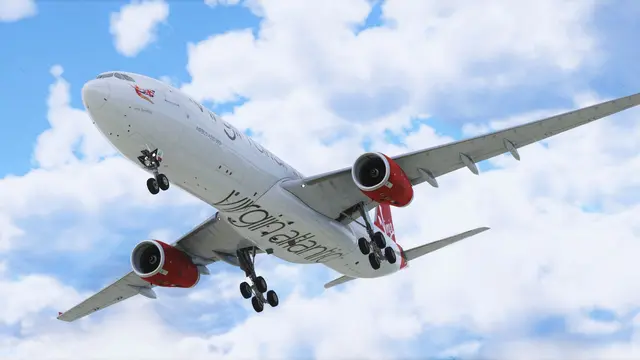 Most realistic flight modelX-Plane 12The most honest flight physics, and the best sim for Mac.
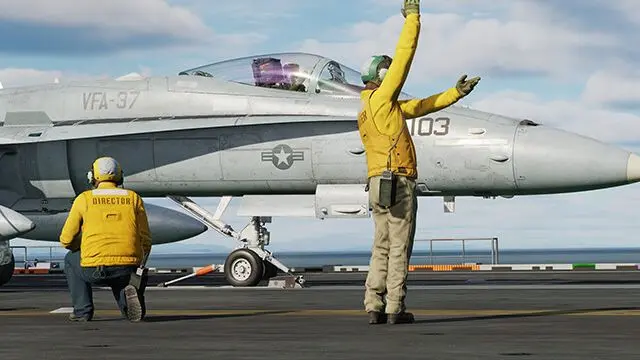 Best combat flight simDCS WorldThe most detailed combat sim there is, and free to start.
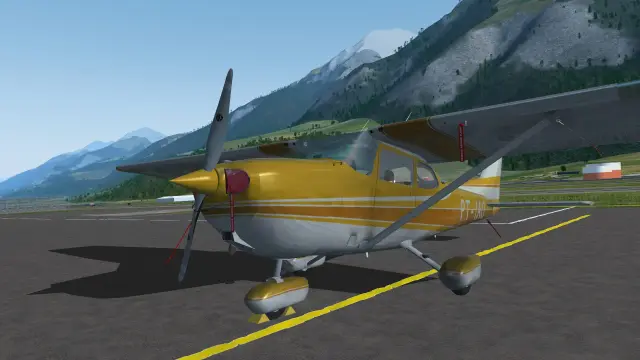 Best free simFlightGearA real flight sim, free forever, on Windows, Mac and Linux.
Looking for "Microsoft Flight Simulator 2026"? There isn't one. MSFS 2024 is the current version and keeps getting free updates. Apps called "Flight Simulator 2026" come from unrelated developers.
Not sure which fits you? Answer four quick questions and we'll match you to a sim, tell you what it needs, and show the controls to start with.
Find your flight sim
Question 1 of 4
The 8 best flight simulators in 2026
Ranked for the typical reader: someone choosing a first or next sim. Every price, platform and requirement comes from the maker or the store, checked October 6, 2026. How we ranked them.
1Image: Microsoft / Asobo StudioBest overall
Microsoft Flight Simulator 2024
The sim most people should start with. It streams the entire planet in photographic detail, teaches you to fly from zero, and runs on PC, Xbox and PS5. The catch: it's the most demanding sim on your hardware, and it needs the internet to fly.
- Runs on
- Windows PC
- Xbox
- PS5
- Price
- $69.99, or Game Pass
- Learning curve
- Easy our take
- What it needs
- A gaming PC with an 8GB graphics card and 32GB of RAM, or an Xbox Series X|S or PS5
- VR
- PC, PS VR2
- Internet to fly
- Needed
- Steam Deck
- Unsupported
- Steam reviews
- Mixed (60%)
Why we like it
- The whole real world, down to your own street
- Built-in lessons and a career mode with real jobs to fly
- Small planes to airliners, helicopters and gliders, plus the biggest add-on market
Watch out for
- Needs a strong gaming PC (or a console) and steady internet
- Windows only on PC: no Mac or Linux
- A rough 2024 launch still drags its all-time Steam score down
More about MSFS 2024
Platforms: Windows PC (Microsoft Store or Steam), Xbox Series X|S, and PS5 and PS5 Pro since December 2025. The Series S runs it at lower detail.
Which edition? Standard ($69.99) is all most people need. Deluxe ($99.99), Premium Deluxe ($129.99) and Aviator ($199.99) add aircraft and handcrafted airports, not better graphics, and you can buy those one at a time later. PC Game Pass and Game Pass Ultimate include the Standard Edition.
VR and internet: VR works on PC, and on PS5 with PS VR2 since Sim Update 5 (April 2026). Microsoft lists 10 Mbps as the minimum connection and 50 Mbps as recommended.
The honest bit: the November 2024 launch was rough, with crowded servers and missing content. Recent Steam reviews are far better ("Mostly Positive", 79% over the 30 days to October 6, 2026), and it gets free updates, new regions and new aircraft every few months.
Own MSFS 2020? It still works and is still sold. MSFS 2024 is a separate purchase, but Microsoft says virtually all MSFS 2020 add-ons work in it, and it needs a third of the disk space (see our storage guide).
2Image: Laminar ResearchMost realistic flight model
X-Plane 12
The sim for people who care most about how an aircraft really flies. It works out the forces on each part of the aircraft as you fly, runs natively on Mac and Linux, asks far less of your PC than MSFS, and has a free demo.
- Runs on
- Windows PC
- Mac
- Linux
- Price
- $59.99, free demo
- Learning curve
- Moderate our take
- What it needs
- A 4-core CPU, 8GB of RAM and a 2GB graphics card to run; an 8GB card and 16–24GB of RAM for high settings
- VR
- PC
- Internet to fly
- Not needed
- Steam Deck
- Unsupported
- Steam reviews
- Very Positive (87%)
Why we like it
- Flight physics that hold up in stalls, spins and crosswinds
- Runs on Windows, Mac (including Apple Silicon) and Linux
- Lighter on hardware, works offline, and you can try it free
Watch out for
- Good scenery, but it doesn't stream the real world like MSFS
- A plainer interface and a steeper first week
- Fewer aircraft out of the box
More about X-Plane 12
Why pilots use it: most sims look up an aircraft's behavior in tables of pre-calculated numbers. X-Plane calculates it from the shape of the wings, tail and body as you fly, so unusual situations behave believably. Its professional version can even be FAA-certified as the software inside approved training devices (with certified hardware around it).
Try before you buy: the free demo is the full sim with about 15 minutes of flying at a time. It's the easiest way to check how it runs on your computer.
In the box: a small fleet that covers the basics, including a Cessna 172, a Boeing 737-800 and an Airbus A330. Some of the best add-on airliners for it come from small teams and the community.
Still improving: version 12.4 (February 2026) spread scenery loading across multiple CPU cores, and updates through September 2026 added more performance work, airports and avionics features.
3Image: Eagle DynamicsBest combat flight sim
DCS World
The sim for fighter jets, attack helicopters and warbirds, modeled down to almost every switch, sensor and weapon. The base game, two aircraft and two maps are free. The full aircraft you'll want later cost extra, and each one takes real study.
- Runs on
- Windows PC
- Price
- Free, aircraft extra
- Learning curve
- Very steep our take
- What it needs
- A Windows PC with 32GB of RAM (16GB minimum), an 8GB graphics card and 500GB on an SSD
- VR
- PC
- Internet to fly
- Not needed
- Steam Deck
- Playable
- Steam reviews
- Very Positive (85%)
Why we like it
- Free to download, with two aircraft and two maps
- Jets and helicopters you can spend months mastering
- Aircraft-carrier flying, a big online community and a mission editor
Watch out for
- Windows PC only
- Full aircraft list at $79.99 each (they go on sale often)
- Hungry for memory and storage: 32GB of RAM and an SSD recommended
More about DCS World
What's free: the Su-25T attack jet and the TF-51D Mustang, plus the Caucasus and Marianas maps. You can fly online and build missions without paying anything.
What costs extra: full aircraft such as the F-16C Viper and F/A-18C Hornet ($79.99 each at list price) and most other maps. On Steam or Eagle Dynamics' own store, big sales often cut aircraft prices in half.
How to start: fly the two free aircraft first. Before you buy a jet, watch a few videos of its cockpit and pick one that matches what you want to do (air-to-air, ground attack or carrier flying).
Controls matter more here: a HOTAS (hands-on throttle and stick, so your fingers never leave the controls) and head tracking or VR make a bigger difference in DCS than in any civilian sim.
 4
4Best for older PCs and VR
Aerofly FS 4
Smooth, pretty and quick to start, even on modest PCs.
Details, pros and cons
The pick when you want relaxed, good-looking flights without a powerful PC or a long setup. It loads fast, runs well on modest hardware, and is known for easy, comfortable VR. It's simpler than MSFS or X-Plane, with far fewer aircraft.
- Runs on
- Windows PC
- Mac
- Linux
- Price
- $59.99
- Learning curve
- Easy our take
- What it needs
- A quad-core CPU, 8GB of RAM and a 4GB graphics card to run; an 8GB card and 16GB of RAM recommended
- VR
- PC
- Internet to fly
- Not needed
- Steam Deck
- Verified
- Steam reviews
- Very Positive (89%)
Why we like it
- Runs well on PCs that struggle with MSFS 2024
- Smooth, easy VR
- Windows, Mac and Linux, and Steam Deck Verified
Watch out for
- Far fewer aircraft than MSFS or X-Plane
- Less depth in aircraft systems
- Detailed scenery covers some regions, not the whole world
What you get: airliners, small planes, helicopters, gliders and a fighter jet, more than 1,200 custom airports, worldwide terrain and base imagery, and free high-detail scenery for parts of the US and Europe.
What it needs: a quad-core processor, 8GB of RAM, a 4GB graphics card and 100GB of space. It runs on Windows, macOS (Apple M1 or newer) and Linux.
Who it's for: VR flyers, owners of older or modest PCs, and anyone who wants pretty flights in a few minutes rather than deep procedures.
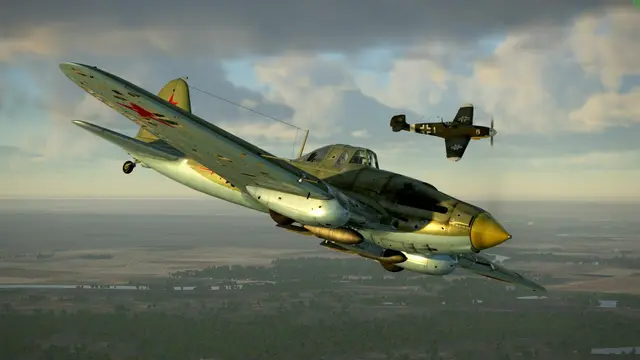
Image: IPACS
 5
5Best World War II sim
IL-2 Sturmovik: Great Battles
World War II dogfights, easier to get into than modern jets.
Details, pros and cons
The World War II combat sim, with convincing flight and damage models and big online battles. It's easier to get into than a modern DCS jet, because there's no radar or missiles to learn, just flying and gunnery.
- Runs on
- Windows PC
- Price
- $49.99 per battle
- Learning curve
- Steep our take
- What it needs
- A Windows PC with 16GB of RAM and a 4GB graphics card at minimum, and 95GB of space
- VR
- PC
- Internet to fly
- Not needed
- Steam Deck
- Unsupported
- Steam reviews
- Mostly Positive (79%)
Why we like it
- Superb warbird flight and damage modeling
- Quicker to learn than modern jets
- VR support and busy online servers
Watch out for
- Sold battle by battle, so a full collection adds up
- Windows PC only
- Mostly World War II (plus a World War I spin-off)
How it's sold: each "battle" is a separate purchase with its own map and aircraft, for example Battle of Stalingrad ($49.99 on Steam). Start with one that has the aircraft you want to fly.
Why pick it over DCS: World War II aircraft are flown by hand, so you spend your time flying and fighting instead of learning radar and weapon systems. Steam's review score shown here is for Battle of Stalingrad.
Image: 1C Game Studios
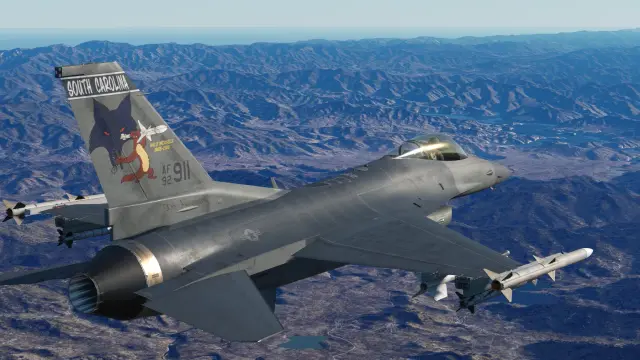 6
6Deepest F-16 sim, free
Falcon BMS
One jet, the F-16, in a living air war. Free, with a catch.
Details, pros and cons
A free, fan-made rebuild of the 1998 classic Falcon 4.0. It models one aircraft, the F-16, in great depth, inside a campaign where the whole war moves on around you. You need a copy of Falcon 4.0 to install it.
- Runs on
- Windows PC
- Price
- Free + Falcon 4.0 ($14.99)
- Learning curve
- Very steep our take
- What it needs
- A Windows PC and a copy of Falcon 4.0, the 1998 game it builds on
- VR
- PC
- Internet to fly
- Not needed
- Steam Deck
- Not on Steam
- Steam reviews
- Not on Steam
Why we like it
- A dynamic campaign no other combat sim matches
- The F-16 modeled in extraordinary depth
- The mod itself is free; Falcon 4.0 costs $14.99
Watch out for
- Essentially one aircraft
- Older graphics than DCS, even after the 4.38 update
- Installation and setup take patience
Getting it: buy Falcon 4.0 (on Steam or GOG), then download Falcon BMS for free from the official site. Version 4.38 brought a new terrain engine and new F-16 and F-15C cockpits, and VR has been supported since 4.37.
Who it's for: F-16 fans who want a war that feels alive, with whole air forces fighting around their own flight.
Image: Benchmark Sims
7Best free sim
FlightGear
A real flight sim, free forever, on Windows, Mac and Linux.
Details, pros and cons
The best free civilian sim you can install. It's open source, covers the whole world, has hundreds of aircraft and runs on modest computers. It looks dated next to MSFS, and aircraft quality varies a lot, but the flying is real.
- Runs on
- Windows PC
- Mac
- Linux
- Price
- Free
- Learning curve
- Moderate our take
- What it needs
- A modest computer on Windows, Mac or Linux
- VR
- Not officially
- Internet to fly
- Not needed
- Steam Deck
- Not on Steam
- Steam reviews
- Not on Steam
Why we like it
- Completely free, with no time limits
- Windows, Mac and Linux, on modest hardware
- Hundreds of aircraft and the whole world
Watch out for
- Looks dated next to the commercial sims
- Aircraft quality varies from excellent to rough
- Less polished menus and setup
Latest version: 2024.1 (the 2024.1.7 update came out in August 2026), free from the official site.
Who it's for: anyone who wants to learn the basics without paying, Linux users, and tinkerers who like to build their own aircraft.
Image: The FlightGear project
 8
8Best in a web browser
GeoFS
Free in your browser, on almost any device.
Details, pros and cons
The easiest way to find out if flying is for you. It runs free in a web browser on almost any computer, phone or tablet, builds the whole world from satellite images, and lets you fly alongside other players around real live air traffic.
- Runs on
- Browser
- Phone
- Price
- Free, HD scenery paid
- Learning curve
- Easy our take
- What it needs
- Any computer, phone or tablet with a modern web browser
- VR
- No
- Internet to fly
- Needed
- Steam Deck
- Not on Steam
- Steam reviews
- Not on Steam
Why we like it
- Free, with nothing to install
- Runs on almost any computer, phone or tablet
- Fly online with other players and real live traffic
Watch out for
- Much simpler than an installed sim
- Sharper HD scenery is a paid subscription
- Needs an internet connection
What you get free: about 30 aircraft (from a Piper Cub to airliners and a hot-air balloon), worldwide satellite scenery, and multiplayer. A paid subscription adds sharper HD aerial imagery.
Who it's for: anyone curious about flying, Chromebook and phone users, and quick flights when you're away from your sim PC.
Image: GeoFS
The best flight simulator for your device
What you already own decides more than anything else. Find yours:
Gaming PC
Microsoft Flight Simulator 2024
Best all-rounder with an 8GB graphics card. Older PC? X-Plane 12 and Aerofly FS 4 ask far less.
PCs for MSFS 2024 →Gaming laptop
Microsoft Flight Simulator 2024
Fine with an 8GB graphics card. On a thin office laptop, try the X-Plane 12 demo or GeoFS first.
Laptops for MSFS 2024 →Mac
Native on Apple Silicon. Aerofly FS 4 and FlightGear run too; MSFS and DCS don't.
X-Plane 12 hardware →Xbox Series X|S
Microsoft Flight Simulator 2024
The only serious sim on Xbox, and it's in Game Pass Ultimate. Controls must say "Designed for Xbox".
Xbox controls →PlayStation 5
Microsoft Flight Simulator 2024
On PS5 since December 2025, with PS VR2 since April 2026. Only a few licensed Thrustmaster controllers work.
PS5 controls →Steam Deck
Valve rates it Verified. DCS World is Playable; MSFS 2024 and X-Plane 12 are Unsupported.
VR headset
MSFS 2024, DCS or Aerofly FS 4
MSFS 2024 for the real world (PC or PS VR2), DCS for combat, Aerofly FS 4 for the simplest VR.
VR headsets ranked →Phone or tablet
Infinite Flight
The most complete mobile sim (iPhone, iPad, Android), with live online air traffic control. Pro: $9.99 a month or $79.99 a year. GeoFS runs in a mobile browser too.
All 8 compared side by side
| Sim | PC | Mac | Xbox | PS5 | Steam Deck | VR | Internet to fly | Price |
|---|---|---|---|---|---|---|---|---|
| 1MSFS 2024 | Yes | — | Yes | Yes | Unsupported | PC, PS VR2 | Needed | $69.99, or Game Pass |
| 2X-Plane 12 | Yes | Yes | — | — | Unsupported | PC | No | $59.99, free demo |
| 3DCS World | Yes | — | — | — | Playable | PC | No | Free, aircraft extra |
| 4Aerofly FS 4 | Yes | Yes | — | — | Verified | PC | No | $59.99 |
| 5IL-2 | Yes | — | — | — | Unsupported | PC | No | $49.99 per battle |
| 6Falcon BMS | Yes | — | — | — | Not on Steam | PC | No | Free + Falcon 4.0 ($14.99) |
| 7FlightGear | Yes | Yes | — | — | Not on Steam | Not officially | No | Free |
| 8GeoFS | Browser | Browser | — | — | Not on Steam | No | Needed | Free, HD scenery paid |
List prices as of October 2026. Steam sales often cut them by a third or more. "Browser" means it runs in a web browser on that computer.
What is the most realistic flight simulator?
It depends on which kind of realism you mean. X-Plane 12 is the most realistic for how a civilian aircraft flies, because it calculates the forces on each part of the aircraft instead of reading them from tables. MSFS 2024 is the most realistic for how the world looks: no other sim streams the whole planet in 3D photographic detail. DCS World is the most realistic for military aircraft and their systems, down to radar modes and weapons.
-
How it fliesX-Plane 12
Does the aircraft move like the real one, even in a stall or a gusty crosswind? Also: DCS World for military aircraft.
-
How the world looksMSFS 2024
Can you fly over your own street and recognize it? Also: GeoFS streams the planet too, but without 3D cities and fine detail.
-
How deep the systems goDCS World
Does every switch, radar mode and failure work like the real thing? Also: Study-level add-on airliners for MSFS and X-Plane.
For airliners, the deepest realism comes from "study-level" add-ons, aircraft modeled switch by switch by specialist developers, which exist for both MSFS and X-Plane.
The best flight simulator for beginners
Microsoft Flight Simulator 2024. Its lessons start from zero, you can turn on assists one at a time and switch them off as you improve, and almost any controller works. If you're on a PC or Xbox, Game Pass lets you try it without buying it.
- MSFS 2024Easy
- Aerofly FS 4Easy
- GeoFSEasy
- X-Plane 12Moderate
- FlightGearModerate
- IL-2Steep
- DCS WorldVery steep
- Falcon BMSVery steep
- Easy: flying on your first evening
- Moderate: a few evenings to feel at home
- Steep: weeks to learn properly
- Very steep: weeks for each aircraft
Your first week, whatever you fly:
- Start small. A Cessna 172 around your local airport teaches more than a jumbo jet across the ocean.
- Do the built-in lessons. MSFS 2024's flight training and X-Plane 12's flight school cover takeoff, turns and landing step by step.
- Use the assists, then drop them. Turn one off each time a flight feels easy.
- Get a stick before anything else. Even a basic one makes flying far easier than a keyboard.
The best free flight simulators
- DCS World is the best free sim if military aircraft interest you at all: two aircraft and two maps, free forever.
- FlightGear is the best free civilian sim you install, on Windows, Mac and Linux.
- GeoFS runs free in a web browser, with nothing to install.
- The X-Plane 12 demo is the full sim, with about 15 minutes of flying at a time.
One more cheap way in: PC Game Pass (about $14 a month) and Game Pass Ultimate include MSFS 2024, so a month costs far less than buying the game. And Google Earth hides a basic flight simulator in its Tools menu, now in the web version too: here's how to use it. It's a fun curiosity, not a real sim.
Can your PC run it?
The short version: MSFS 2024 and DCS World want a real gaming PC (an 8GB graphics card and 32GB of RAM), while X-Plane 12 and Aerofly FS 4 start on much less. Here's how they compare, from each maker's recommended spec:
Graphics card: all four recommend one with 8GB of memory. The real differences are below.
Memory (RAM)
- MSFS 2024 32GB
- DCS World 32GB
- X-Plane 12 16–24GB
- Aerofly FS 4 16GB
Storage
- DCS WorldSSD, plus paid aircraft and maps 500GB
- Aerofly FS 4 100GB
- MSFS 2024The world streams in 50GB
- X-Plane 12 25GB
Internet while you fly
- MSFS 202450 Mbps, always on
- X-Plane 12Not needed to fly
- DCS WorldNot needed to fly
- Aerofly FS 4Not needed to fly
Full minimum and recommended specs
Minimum means the sim starts and runs at low settings. Recommended is what the maker suggests for smooth flying at good settings.
| Sim | Minimum | Recommended |
|---|---|---|
| MSFS 2024 | GTX 970 or RX 5700 (4GB), 16GB RAM, Ryzen 5 2600X or Core i7-6800K | RTX 2080 or RX 5700 XT (8GB), 32GB RAM, Ryzen 7 2700X or Core i7-10700K |
| X-Plane 12 | Any 2GB card (Vulkan 1.3), 8GB RAM, 4-core CPU | RTX 3070-class 8GB card, 16 to 24GB RAM, Core i5-12600K or Ryzen 5 3500, or Apple Silicon |
| DCS World | 6GB card, 16GB RAM, Core i3 or AMD FX, 250GB free | 8GB card, 32GB RAM, Core i5 or Ryzen, 500GB SSD |
| Aerofly FS 4 | 4GB card, 8GB RAM, Core i5-4590 or FX 8350, 100GB | 8GB card, 16GB RAM |
| IL-2 | 4GB card, 16GB RAM, Core i5 or i7 at 3GHz+, 95GB | Not published |
Check what you have (Windows): press Ctrl + Shift + Esc to open Task Manager and open the Performance tab. GPU shows your graphics card and its "Dedicated GPU memory", and Memory shows your RAM. On a Mac, open the Apple menu, then About This Mac.
Graphics memory isn't the whole story. An old 8GB card can still be much slower than the card a maker recommends. If yours is several years old, check it against our graphics card rankings for MSFS 2024, or see our ready-built PCs, gaming laptops and three PC builds.
Controls to start with
Every PC and console sim here works with a keyboard and mouse (MSFS also with an Xbox or PlayStation controller), but a flight controller is the single biggest upgrade you can make. Two rules before you buy:
- On consoles, check the label. On Xbox, a controller must say "Designed for Xbox" or it won't connect. On PS5, MSFS 2024 supports only a handful of officially licensed Thrustmaster controllers so far.
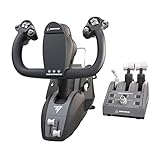
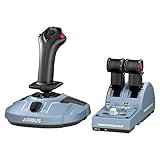
- Match the controller to the flying. A stick and throttle is the all-rounder and the right first buy for jets and helicopters. A yoke suits small planes and Boeing airliners. Airbus jets use a sidestick.
MSFS 2024 on PC and Xbox: starter picks
| Part | Our pick | Price |
|---|---|---|
| The sim Microsoft Flight Simulator 2024, Standard Edition. One code plays on both Xbox Series X|S and Windows. | Microsoft Flight Simulator 2024 Standard Edition (Xbox Series X|S and Windows, digital code) Standard is all most people need. Pricier editions add aircraft and airports, not better graphics. | Check price |
| Stick + throttle (PC, Xbox) The stick steers the plane. The throttle sets the power. Twist the stick for rudder. | Thrustmaster T.Flight Hotas One (MSFS 2024 Edition) The safest first controller: it flies everything from a Cessna to a helicopter, on Xbox and PC. | Check price |
| Yoke + throttle (PC) A yoke plus a three-lever throttle: power, propeller and mixture. | Logitech G Pro Flight Yoke System The classic first yoke for small planes. Plastic, but it does the job. | Check price |
| Yoke + throttle (Xbox, PC) Yoke, throttle quadrant and trim wheel in one box. | Turtle Beach VelocityOne Flight Universal Control System A yoke that works on Xbox, with a small built-in display and rudder controls of its own. | Check price |
| Boeing yoke + throttle (Xbox, PC) A Boeing-style yoke and an airliner throttle quadrant. | Thrustmaster TCA Yoke Pack Boeing Edition For airliner flyers on Xbox or PC. TFRP pedals plug into the yoke. | Check price |
| Airbus sidestick + thrust levers (PC) Replicas of the A320 sidestick and thrust levers. | Thrustmaster TCA Officer Pack Airbus Edition The cheapest way into an Airbus-style cockpit. | Check price |
| Rudder pedals (PC, Xbox, PS5) Steer on the runway, keep turns balanced, land in a crosswind. | Thrustmaster TFRP T.Flight Rudder Pedals Plug into any Thrustmaster stick or yoke here, so they work on consoles too. Each pedal tilts to brake. | Check price |
| Stick, throttle + pedals (PC, Xbox) The Hotas One and TFRP pedals as a single kit. | Thrustmaster T.Flight Full Kit X (Hotas One + TFRP pedals) Usually a little cheaper than buying the two separately. The pick for helicopters, which need pedals. | Check price |






Links go to Amazon, where you'll see today's price. As an Amazon Associate we earn from qualifying purchases, at no cost to you.
MSFS 2024 on PS5: starter picks
| Part | Our pick | Price |
|---|---|---|
| Stick + throttle (PS5, PC) The stick steers, the throttle sets power. Twist for rudder. | Thrustmaster T.Flight Hotas 5 (Microsoft Flight Simulator Edition) One of the few sticks MSFS supports on PS5. Stock comes and goes. | Check price |
| Yoke (PS5, PC) Yoke, throttle, trim and rudder controls in one box. | Thrustmaster TCA Sky Yoke (PS5 version) The first yoke that works on PS5. Pre-order: ships October 28, 2026. | Check price |
| Rudder pedals (PS5, PC, Xbox) Steer on the runway, keep turns balanced, land in a crosswind. | Thrustmaster TFRP T.Flight Rudder Pedals On PS5 they plug into the Hotas 5 or the Sky Yoke. | Check price |


Links go to Amazon, where you'll see today's price. As an Amazon Associate we earn from qualifying purchases, at no cost to you.
X-Plane 12 on a Mac: starter picks
| Part | Our pick | Price |
|---|---|---|
| Compact yoke (Mac, PC) A smaller, simpler Honeycomb yoke. | Honeycomb Alpha LITE Honeycomb officially supports its yokes and throttle in X-Plane on Mac. | Check price |
| Throttle quadrant (Mac, PC) Power levers, plus flaps, landing gear, trim and autopilot buttons. | Honeycomb Bravo Throttle Quadrant Comes with airliner and small-plane lever handles. Swap them in seconds. | Check price |


Links go to Amazon, where you'll see today's price. As an Amazon Associate we earn from qualifying purchases, at no cost to you.
DCS World and other combat sims (PC): starter picks
| Part | Our pick | Price |
|---|---|---|
| Budget stick + throttle (PC) A basic stick and a separate throttle. Twist the stick for rudder. | Thrustmaster T.Flight Hotas X An old design, and it shows, but it's the cheapest real way to fly the free DCS aircraft. | Check price |
| Fighter HOTAS (PC) A stick plus a twin throttle with dozens of switches. | Logitech G X56 H.O.T.A.S. Room for all the switches a full DCS jet wants. | Check price |
| Head tracking (PC) Turn your head a little and the view in the sim turns a lot. | TrackIR 5 with TrackClip Pro In a dogfight you have to keep your eyes on the other jet. This is how you do it on a monitor. | Check price |


Links go to Amazon, where you'll see today's price. As an Amazon Associate we earn from qualifying purchases, at no cost to you.
Want more choice? See our full rankings of flight sticks, yokes, rudder pedals and VR headsets, or plan a whole setup with our home cockpit guide.
What a flight sim really costs
The game is the cheap part. Here's where the money usually goes, from least to most:
- The sim: free (DCS World, FlightGear, GeoFS) to $69.99 (MSFS 2024 Standard), or a Game Pass subscription.
- A controller: a basic stick and throttle costs about as much as the game. A yoke and pedals for a desk cockpit run a few hundred dollars.
- Add-ons, if you want them: a full DCS jet lists at $79.99, and the most detailed add-on airliners for MSFS and X-Plane cost about as much as the base game, sometimes more.
- The computer: the big one, if yours can't keep up. That's why it pays to pick the sim first: X-Plane 12 on an older PC can cost nothing extra, while MSFS 2024 at high settings may mean a new graphics card.
MSFS 2024 vs X-Plane 12, and other matchups
MSFS 2024 or X-Plane 12? MSFS 2024 if you want the real world in stunning detail, career missions, a console, or the easiest start. X-Plane 12 if you want the most realistic flight model, fly on a Mac, or have an older PC. Plenty of simmers own both. Our X-Plane 12 vs MSFS comparison goes deeper.
MSFS 2024 or MSFS 2020? Buy MSFS 2024: it gets the new features, needs less disk space, and runs most MSFS 2020 add-ons. If you already own 2020, there's no rush.
DCS World or MSFS for military jets? DCS World. MSFS has military jets you can fly, but no weapons, radar or combat.
DCS World or IL-2? IL-2 for World War II dogfights you can learn in days. DCS for modern jets and systems you'll study for weeks.
How we ranked these sims
We ranked for the typical reader: someone choosing a first or next sim, most often on a Windows PC. Each sim was judged on:
- Who it serves: how many kinds of flying it does well, and on how many devices.
- How real it is: flight model, world and aircraft systems.
- How alive it is: recent updates and an active community.
- Value and access: price, free options and what it asks of your hardware.
What we don't do: we haven't flown every aircraft in every sim, and we don't run lab tests. Prices, platforms, Steam Deck ratings, system requirements and Steam review scores come from the makers' pages and the Steam store, checked October 6, 2026. Steam scores are all-time user reviews in all languages. The learning curve is our own judgment and is labeled that way. Images come from each sim's maker.
Also considered:
- Microsoft Flight Simulator (2020) is still sold ($59.99), now as the 40th Anniversary Edition, and still good, but MSFS 2024 replaces it for new buyers.
- Prepar3D v6 from Lockheed Martin is built for professional training and licensed by use (Personal $59.95, Professional $350). For home flying, MSFS or X-Plane is the better buy.
- Infinite Flight is the best sim for phones and tablets (see the device guide), but it's in a different class from the PC sims above.
- Ace Combat 7 and War Thunder are great fun, but they're action games with simplified flying, not simulators.
Updates: October 6, 2026: rebuilt for 2026 with MSFS 2024 on PS5, Steam Deck ratings, IL-2 and Falcon BMS, and current prices and requirements.
Product links go to Amazon, and we earn a commission on purchases at no cost to you. We earn nothing from the games we rank (the one exception is the MSFS 2024 code), so commissions don't shape the ranking.