X-Plane 12
Best Flight Sim Chairs, Stands and Cockpits for X-Plane 12
7 sim seats ranked for X-Plane 12 by controls it holds, seat, adjustability, space needed and stability. Each score comes from the product's published specs.
This page contains affiliate links. As an Amazon Associate we earn from qualifying purchases.
7 sim seats at a glance
| # | Sim Seat | Score | Price |
|---|---|---|---|
| 1 | NLR Flight Simulator Cockpit Boeing Commercial Best overall · Mid-Range · Full cockpit (seat and frame) · Holds 5 controls | 89.5 /100 | Check price |
| 2 | Marada Flight Simulator Cockpit Mid-Range · Full cockpit (seat and frame) · Holds 5 controls | 88.0 /100 | Check price |
| 3 | Dardoo Flight Sim Stand Best budget · Budget · Stand for the chair you own · Holds 4 controls | 76.5 /100 | Check price |
| 4 | Marada Flight Sim Chair Budget · Flight chair with control arms · Holds 2 controls | 72.3 /100 | Check price |
| 5 | Wheel Stand Pro for Logitech Yoke Budget · Stand for the chair you own · Holds 3 controls | 65.0 /100 | Check price |
| 6 | Wheel Stand Pro for Honeycomb Budget · Stand for the chair you own · Holds 3 controls | 62.0 /100 | Check price |
| 7 | Honeycomb Lima Flight Chair Mid-Range · Chair for flying at a desk · No control mounts | 54.5 /100 | Check price |




All Sim Seats Ranked for X-Plane 12
- #1 Best overall
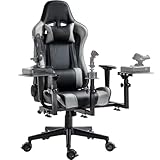
NLR Flight Simulator Cockpit Boeing Commercial
- Mid-Range
- Full cockpit (seat and frame)
- Holds 5 controls
- Needs its own corner
89.5 /100 X-Plane 12 scoreThe NLR Flight Simulator Cockpit Boeing Commercial suits X-Plane 12 pilots who want a sim corner of their own, with a reclining seat and mounts for a yoke, throttle and rudder pedals on a metal frame. It doesn't fold, so measure the corner and the doorway before it arrives.
Strengths and trade-offs
Strengths
- The yoke, throttle and pedals all bolt to the same metal frame as the seat, so the yoke doesn't creep forward when you haul back in the flare and the pedals stay put when you're kicking in rudder on a gusty X-Plane 12 landing.
- Height, reach, tilt, pedal angle and seat recline all adjust, so you can set the yoke where a real one sits and lean the seat back for the cruise leg instead of hunching at a desk for the whole flight.
- It brings a full airliner setup together in one place: there's a spot for a yoke, a stick, a throttle or quadrant, rudder pedals and a keyboard, and Next Level Racing says it fits Thrustmaster, Logitech, Saitek and Honeycomb gear, sticks and HOTAS (hands-on throttle and stick) sets included.
Trade-offs
- At roughly 60 by 39 inches and 109 lb it doesn't fold, so you can't slide it aside after a session; measure the corner and the doorway it has to come through, and leave space to climb in and out.
- You're paying for the seat, the metal frame rated to 330 lb and a mount for every control, where a simple desk clamp or a folding stand costs less and tucks away; you still supply the yoke, throttle and pedals yourself.
- #2
Marada Flight Simulator Cockpit
- Mid-Range
- Full cockpit (seat and frame)
- Holds 5 controls
- Needs its own corner
88.0 /100 X-Plane 12 scoreThe Marada Flight Simulator Cockpit suits X-Plane 12 pilots who want a sim corner of their own, with a reclining seat on a metal frame and mounts for a yoke, throttle and rudder pedals. It doesn't fold, and Marada doesn't state a user-weight rating.
Strengths and trade-offs
Strengths
- The rudder pedals bolt to the metal frame at an angle you set, so they stay put under your feet through a gusty crosswind landing instead of sliding away across the floor.
- Height, reach, tilt and recline all adjust, so you can set the yoke at the height a real one sits for a hand-flown approach and lean the seat back for the quiet part of a long flight.
- It has a place for a yoke, a stick, a throttle or quadrant, rudder pedals and a keyboard, and Marada names Honeycomb yokes and throttles plus sticks and HOTAS (a stick-and-throttle pair), so airliner and light-aircraft flying can share one seat.
Trade-offs
- It's a full rig that doesn't fold, so it needs a corner of its own with room to climb in and out — it won't tuck under a desk when friends come over.
- Marada doesn't state a user-weight rating, so ask before you buy if that matters to you; you're also paying for a seat and frame that a simple desk clamp or a stand for your own chair skips entirely.
- #3 Best budget
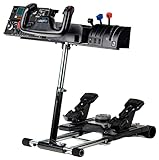
Dardoo Flight Sim Stand
- Budget
- Stand for the chair you own
- Holds 4 controls
- Compact
76.5 /100 X-Plane 12 scoreThe Dardoo Flight Sim Stand suits X-Plane 12 pilots happy with the chair they already own: a metal frame holds a yoke or stick, throttle and rudder pedals at a height you set. There's no seat, and the center plate doubles as a wheel mount, so check your yoke's clamp holes match.
Strengths and trade-offs
Strengths
- The frame is metal, as the maker states, so the yoke bolted to the center plate has something solid behind it when you pull back in the flare, instead of a clamp working loose on a thin desktop halfway down the runway.
- Height, reach and tilt all adjust, and the pedal angle does too, so you can set the yoke where a real one would sit and keep your heels on the floor through a long hand-flown approach in the Cessna.
- It gathers a yoke or stick, a throttle or quadrant and rudder pedals into one piece of kit in front of your own chair, with slots that stop an office chair rolling back, which suits anyone who doesn't want a desk covered in clamps.
Trade-offs
- It's built for flying and racing, so the center plate is drilled to take a yoke or a steering wheel; hole patterns differ between brands, so measure your yoke's clamp against the maker's supported list before you order.
- You get no seat, so your chair height has to work with the frame rather than the other way around, and the maker doesn't say it folds. Spending more buys a rig with the seat built into the frame, so the yoke, pedals and your back all stay in the same relationship every session.
- #4
Marada Flight Sim Chair
- Budget
- Flight chair with control arms
- Holds 2 controls
- Compact
72.3 /100 X-Plane 12 scoreThe Marada Flight Sim Chair suits X-Plane 12 pilots who fly with a stick and throttle at their sides, on arms that rise and recline with the seat. There's no pedal plate, so rudder pedals sit on the floor, where a mat keeps them from sliding.
Strengths and trade-offs
Strengths
- The control arms are built onto the chair, so when you drop the back a notch for a long cruise, the stick and throttle recline with you and stay exactly where your hands left them.
- Height, reach and recline all adjust, so you can set the stick close for fine pitch work on an approach and slide the throttle out to where your elbow rests naturally.
- The casters lock, so when you stand on the rudder pedals in a crosswind landing the chair stays put instead of rolling back from under you, and the metal frame is rated for a 300 lb user.
Trade-offs
- There's no plate for rudder pedals, so they live on the floor and can creep away during a long hand-flown approach; a mat under them is close to essential.
- Spending more buys a frame with a mount for every control, pedals included; here you get the seat and two control arms, and since the maker doesn't say it folds, it holds a chair's footprint in the room between sessions.
- #5
Wheel Stand Pro for Logitech Yoke
- Budget
- Stand for the chair you own
- Holds 3 controls
- Folds away
65.0 /100 X-Plane 12 scoreThe Wheel Stand Pro for Logitech Yoke suits X-Plane 12 pilots who want a yoke, quadrant and pedals off the desk and in front of their own chair, on a metal frame that adjusts for height and tilt. It is built for Logitech (Saitek) yokes only, and no seat comes with it.
Strengths and trade-offs
Strengths
- Height and tilt both adjust, so you can set the yoke where your hands naturally rest and keep them there through a long hand-flown approach in the Cessna.
- The frame is metal, as the maker states, and it folds away for storage, so the living room goes back to being a living room after an evening of circuits.
- It has a place for a yoke, a throttle or quadrant and rudder pedals together, so your feet stay planted on the pedals through a crosswind landing instead of chasing them across the carpet.
Trade-offs
- It is made for the Logitech (Saitek) Pro Flight Yoke, so if you later move to another brand of yoke the mounting plates may not line up with it.
- There is no seat in the box, so your flying position depends on whatever chair or couch you already own; a full cockpit instead fixes the seat and the yoke in a set relationship, and the maker does not state a user-weight rating here.
- #6
Wheel Stand Pro for Honeycomb
- Budget
- Stand for the chair you own
- Holds 3 controls
- Compact
62.0 /100 X-Plane 12 scoreThe Wheel Stand Pro for Honeycomb suits X-Plane 12 pilots who already own a Honeycomb Alpha and Bravo and want them off the desk, on a metal frame with height and tilt adjustment. It brings no seat, and other brands' yokes may not line up with its mounting plates.
Strengths and trade-offs
Strengths
- The frame is metal, as the maker states, so the yoke is anchored to the stand rather than creeping across a desk when you pull back for the flare in X-Plane 12.
- Height and tilt both adjust, so you can set the yoke near the height of a real one and angle the Bravo throttle under your hand for a long hand-flown approach without your arms tiring.
- It has places for a yoke, a throttle or quadrant and rudder pedals, so an Alpha, Bravo and pedals setup moves off the desk and sits in front of the chair or couch you already own.
Trade-offs
- It is built for Honeycomb yokes and throttles only, so if you switch to another brand of yoke later the mounting plates may not line up — check before you commit.
- There's no seat, and the maker doesn't say it folds, so it holds about a chair's footprint all the time; a full cockpit would add a seat and a place for every control, while a plain desk clamp can be packed away after a session.
- #7
Honeycomb Lima Flight Chair
- Mid-Range
- Chair for flying at a desk
- No control mounts
- Compact
54.5 /100 X-Plane 12 scoreThe Honeycomb Lima Flight Chair suits X-Plane 12 pilots who fly at a desk, and its locking casters keep you from rolling backward when you stand on the rudder pedals. The trade-off: it has no control mounts, so your yoke or stick stays clamped to the desk.
Strengths and trade-offs
Strengths
- The casters lock, so the chair stays planted during a crosswind landing when you're pushing hard on one pedal — no slow drift away from the desk mid-flare.
- Height, armrest, headrest and recline all adjust, so you can set the seat so your forearms meet the desk-clamped yoke on a long hand-flown approach, then recline a little once the autopilot has the leg to itself.
- A good fit for the simmer who flies in a room that doubles as an office: the yoke, throttle and pedals stay where they are, and you just swap the chair you sit in.
Trade-offs
- There are no mounts of any kind, so your yoke or stick has to live on a desk with an edge your clamp can grip, and it sits at desk height rather than where a real one would be.
- Spending more buys a frame with a fixed place for the yoke, throttle and pedals; here only the seat is solved, and the maker doesn't state the frame materials or a user-weight rating.


Frequently Asked Questions
What is the best sim seat for X-Plane 12?
Next Level Racing Flight Simulator Cockpit: Boeing Commercial Edition leads with a score of 90/100, making it the top pick for 2026.
How much should I spend on a sim seat for X-Plane 12?
The lowest-priced pick we rank is the Dardoo Flight Sim Stand (77/100). From the Wheel Stand Pro for Honeycomb (62/100) upward you get a better balance of build quality and features. Prices change daily, so check the current price with each Amazon button.
Does X-Plane 12 support sim seats?
Yes — X-Plane 12 natively supports sim seats. Next Level Racing Flight Simulator Cockpit: Boeing Commercial Edition is our top-rated option with a score of 90/100.
What should I look for in a sim seat for X-Plane 12?
Prioritize Controls it holds (35% of scoring) and Seat (20%) when choosing sim seats for flight simulation. These factors have the greatest impact on feel and immersion in X-Plane 12.
Own any of these?
Rate it in one tap. We research the specs; owners know how the gear holds up.
Also Essential for X-Plane 12
Further Reading
- How to Build a Home Flight Simulator Cockpit: The Complete 2026 GuideEverything a beginner needs to build a home flight simulator: the sim, PC or console, controls, screens, VR and seats, plus three complete setups to copy.
How We Score Sim Seats for X-Plane 12
Score formula
controls it holds × 35% + seat × 20% + adjustability × 15% + space needed × 15% + stability × 15%. Ratings come from each product's published specs, and the same formula is applied to every product. Tiers (Budget, Mid-Range, High-End) describe price, not quality. Full methodology · How we research
Comments
Flying with one of these sim seats, or still deciding? Ask a question, share your setup or leave a tip. It helps the next simmer choose.
That didn't send. Check your connection and try again.