Short answer: on a PC, almost any USB stick, yoke or set of pedals works. On Xbox Series X|S, only gear licensed for Xbox connects; the box says "Designed for Xbox". On PS5, Microsoft Flight Simulator 2024 supports the DualSense, a USB keyboard and mouse, and a short list of Thrustmaster controls. On both consoles, rudder pedals plug into your stick or yoke, not into the console.
- PCAlmost anything worksAny USB stick, yoke, throttle or set of pedals can be set up in MSFS, and so can VR headsets and head tracking.Start with: our rankings by deviceSee PC advice
- Xbox Series X|SOnly "Designed for Xbox" gearA stick, yoke or throttle must be licensed for Xbox Series X|S, or it won’t connect, adapter or not.Start with: T.Flight Hotas One or TCA Sky Yoke (Xbox)17 flight controls work
- PS5A short Thrustmaster listBesides the DualSense and a USB keyboard and mouse, MSFS 2024 on PS5 supports only a few Thrustmaster controls.Start with: T.Flight Hotas 5 or TCA Sky Yoke (PS5)5 flight controls work
Check yours now: type a controller's name, or tap your platform to see what works.
Will it work? Check in 10 seconds
Checked against Microsoft’s, Sony’s and the makers’ own lists.
Xbox Series X|S: Only "Designed for Xbox" gear
17 flight controls work on Xbox Series X|S. A stick, yoke or throttle must be licensed for Xbox Series X|S, or it won’t connect, adapter or not.
- Best first stickT.Flight Hotas OneThe classic way in on Xbox: officially licensed, the throttle unclips for a small desk, and the stick twists for rudder. Add TFRP pedals later.Check price on Amazon
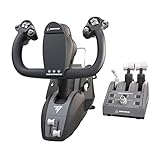
- Best first yokeTCA Sky Yoke (Xbox)A yoke with throttle, trim and rudder controls built in, so one box covers small planes. Pre-order now; it ships October 28, 2026.Pre-order on Amazon
- Best all-in-oneVelocityOne FlightYoke, throttle quadrant, trim wheel and a small display in one unit. Add VelocityOne Rudder pedals through it.Check price on Amazon
- Best for Boeing jetsTCA Yoke Pack BoeingA Boeing-style yoke with a matching two-lever throttle for 737 and 787 flying. TFRP pedals plug into the yoke.Check price on Amazon


Won’t work on Xbox Series X|S (26)
- DualSense
- Honeycomb Alpha — Xbox needs the Alpha XPC
- Honeycomb Alpha LITE
- HOTAS Warthog
- Logitech flight panels
- Logitech G Flight Yoke — PC only; no adapter makes it work on Xbox
- Logitech Rudder Pedals
- Logitech Throttle Quadrant
- Logitech X52 Pro
- Logitech X56
- Meta Quest 3 — Xbox has no VR
- MOZA AB6
- PS VR2 — Xbox has no VR
- Stream Deck
- T.16000M FCS
- T.Flight Hotas 4
- T.Flight Hotas 5
- T.Flight Hotas X — PC only; the Hotas One is its Xbox twin
- TCA Officer Pack Airbus — Xbox needs the X version (TCA Sidestick X or Captain Pack X)
- TCA Sky Yoke (PS5) — Buy the Xbox version instead
- Thrustmaster TPR
- Tobii Eye Tracker 5 — Head tracking is PC only
- TrackIR 5 — Head tracking is PC only
- VIRPIL
- VKB sticks
- WINWING URSA MINOR
Pedals and add-on throttles plug into your stick or yoke, so stay with one brand.
Best Controllers for Xbox Series X|S
The Xbox list is longer than most people expect: Thrustmaster, Turtle Beach, Honeycomb and HORI all make flight controls licensed for Xbox. Every pick below works on Xbox Series X|S and on a Windows PC, so nothing is wasted if you move to PC later.
Best first stick
T.Flight Hotas One
- PC
- Xbox Series X|S
The classic way in on Xbox: officially licensed, the throttle unclips for a small desk, and the stick twists for rudder. Add TFRP pedals later.
Skip it if you mainly fly airliners: a yoke or an Airbus sidestick will feel more natural.
Best first yoke
TCA Sky Yoke (Xbox)
- PC · Ships Oct 28
- Xbox Series X|S · Ships Oct 28
A yoke with throttle, trim and rudder controls built in, so one box covers small planes. Pre-order now; it ships October 28, 2026.
Skip it if you fly fighters or helicopters (pick a stick), or you need controls before October 28.
Best all-in-one
VelocityOne Flight
- PC
- Xbox Series X|S
Yoke, throttle quadrant, trim wheel and a small display in one unit. Add VelocityOne Rudder pedals through it.
Skip it if your desk is small: the yoke and throttle quadrant are one wide unit.
Best for Boeing jets
TCA Yoke Pack Boeing
- PC
- Xbox Series X|S
A Boeing-style yoke with a matching two-lever throttle for 737 and 787 flying. TFRP pedals plug into the yoke.
Skip it if you fly small planes or Airbus jets: the yoke and two-lever throttle are shaped for Boeing airliners.
Best for Airbus jets
TCA Captain Pack X Airbus
- PC
- Xbox Series X|S
The Airbus sidestick and thrust levers as one Xbox kit. TFRP pedals plug into the stick.
Skip it if you fly Boeing airliners or small planes, which use a yoke.
Best for jets and helicopters
VelocityOne H.O.T.A.S.
- PC
- Xbox Series X|S
A full stick-and-throttle set with more buttons than the Hotas One, for military jets and helicopters.
Skip it if you're just starting out: the Hotas One covers the basics with fewer buttons to learn.
Best pedals
Thrustmaster TFRP
- PC
- Xbox Series X|S · Via another device
- PS5 · Via another device
The most affordable pedals that work on Xbox: they plug into any Thrustmaster Xbox stick or yoke, and each pedal tilts to brake.
Skip it if your stick or yoke isn't Thrustmaster: on Xbox, these pedals only plug into Thrustmaster gear.


Buttons go to Amazon, where you’ll see today’s price and stock. As an Amazon Associate we earn from qualifying purchases; it never changes what we recommend.
Which one is right for you? Match it to what you fly:
- First setup, small planes: the T.Flight Hotas One is the cheapest way in. Want a yoke instead? The TCA Sky Yoke has throttle, trim and rudder controls built in.
- Airliners: the TCA Yoke Pack Boeing for 737 and 787 flying, or the TCA Captain Pack X for Airbus jets.
- Everything in one box: the Turtle Beach VelocityOne Flight (yoke, throttle quadrant and trim wheel).
- Jets and helicopters: the T.Flight Hotas One, or the VelocityOne H.O.T.A.S. for more buttons.
- Pedals for any of these: Thrustmaster TFRP with a Thrustmaster stick or yoke; VelocityOne Rudder with the VelocityOne Flight.
- Honeycomb fans: the Alpha XPC is the Xbox version of the Alpha yoke, and the Honeycomb Xbox Hub lets the Bravo throttle and Charlie pedals join it. The XPC isn't sold on Amazon right now.
Xbox rules worth knowing
- Look for "Designed for Xbox." If the box or listing doesn't name Xbox Series X|S, the console won't use it. USB adapters that make a PC device pretend to be an Xbox controller aren't supported by Microsoft.
- Pedals plug into your stick or yoke. Thrustmaster TFRP pedals connect to a Thrustmaster Xbox stick or yoke, VelocityOne Rudder pedals to the VelocityOne Flight, and Honeycomb's Charlie pedals to the Xbox Hub. Pick one brand and grow within it.
- A USB keyboard and mouse work too. Microsoft recommends them for menus and flight planning.
- Xbox One and Xbox Cloud Gaming are different. On Xbox One, phones, tablets and browsers, MSFS streams through Xbox Cloud Gaming, which supports Xbox controllers and touch only. Flight sticks and yokes need an Xbox Series X|S (or a PC).
Best Controllers for PS5
The PS5 list is short. Microsoft Flight Simulator 2024 arrived on PS5 in December 2025, and so far only Thrustmaster has PS5 flight controls that MSFS supports. Everything below is officially supported, and all of it works on PC too.
Best stick
T.Flight Hotas 5
- PC
- PS5
The current PS5 stick for MSFS 2024: officially licensed, recognized automatically, and the throttle unclips. It also works on PC.
Skip it if you only fly small planes or airliners: the TCA Sky Yoke (PS5) arrives October 28.
The only PS5 yoke
TCA Sky Yoke (PS5)
- PC · Ships Oct 28
- PS5 · Ships Oct 28
The first yoke that works on PS5, with throttle, trim and rudder controls built in. Pre-order now; it ships October 28, 2026.
Skip it if you fly jets or helicopters: the Hotas 5 suits them better.
Best pedals
Thrustmaster TFRP
- PC
- Xbox Series X|S · Via another device
- PS5 · Via another device
The only pedals that work on PS5: they plug into the Hotas 4, Hotas 5 or Sky Yoke, and each pedal tilts to brake.
Skip it if you fly with the DualSense alone: the pedals need a Hotas 4, Hotas 5 or Sky Yoke to plug into.


Buttons go to Amazon, where you’ll see today’s price and stock. As an Amazon Associate we earn from qualifying purchases; it never changes what we recommend.
The simple PS5 setup: a T.Flight Hotas 5 for jets and helicopters, or the TCA Sky Yoke (PS5) for planes, then TFRP pedals plugged into either one.
PS5 rules worth knowing
- The DualSense is a good start. MSFS uses its adaptive triggers, gyro, touchpad and speaker, so try it before buying anything.
- A USB keyboard and mouse work for menus and flight planning.
- Pedals plug into your stick or yoke. The TFRP pedals connect to the T.Flight Hotas 4, Hotas 5 or TCA Sky Yoke (PS5 version).
- Most brands don't work on PS5 yet. Honeycomb, Logitech and Saitek, Turtle Beach, VKB, VIRPIL, WINWING and MOZA aren't supported. Other PS5 flight sticks, like HORI's, aren't on Microsoft's list either: only buy one for MSFS if its maker names Microsoft Flight Simulator 2024 on PS5.
- PS VR2 works since Sim Update 5 (April 30, 2026), with every aircraft in the sim.
- The Sky Yoke comes in two versions. Buy the PS5 one: the Xbox version doesn't work on PS5, and the other way round.
Best Controllers for PC
On a Windows PC, Microsoft Flight Simulator works with almost any USB stick, yoke, throttle or set of pedals, and you can mix brands freely. Popular models are recognized with ready-made control profiles; anything else just needs its buttons assigned once in the sim's control settings.
So on PC, the real question isn't "will it work?" but "which one is best?" Our rankings answer that for each kind of device:
- Best flight sticks for MSFS
- Best yokes for MSFS
- Best throttle quadrants for MSFS
- Best rudder pedals for MSFS
- Best VR headsets for MSFS
Might add a console later? Buy a model licensed for it: everything in the Xbox picks and the PS5 picks works on PC too.
PC-only extras: head tracking (TrackIR 5 or the Tobii Eye Tracker 5, so the view follows your head), PC VR headsets like the Meta Quest 3, and cockpit panels like Logitech's radio and switch panels (they need a free plug-in in MSFS 2024) or a Stream Deck. None of these work on Xbox or PS5.
Building a whole setup? Our beginner's cockpit guide walks through every piece in order.
Will My PC Controller Work on Xbox or PS5?
Here's the answer brand by brand. The rule behind all of it: if the box doesn't name your console, assume it won't work on it. Everything in this table also works on PC.
| Brand | Works on Xbox Series X|S | Works on PS5 |
|---|---|---|
| Thrustmaster | T.Flight Hotas One, Full Kit X, TCA Sidestick X, TCA Captain Pack X, TCA Yoke Pack Boeing, TCA Sky Yoke (Xbox version) | T.Flight Hotas 4 and 5, TCA Sky Yoke (PS5 version) |
| Turtle Beach | VelocityOne Flight, Flightstick, H.O.T.A.S. and Rudder | None |
| Honeycomb | Alpha XPC only; the Bravo and Charlie join it through the Xbox Hub | None |
| HORI | HOTAS Flight Stick for Xbox | None confirmed for MSFS |
| Logitech and Saitek | None | None |
| VKB, VIRPIL, WINWING, MOZA | None | None |
| VR headsets | No VR on Xbox | PS VR2 only |
Two Thrustmaster details trip people up. The TFRP pedals work on both consoles, but only plugged into a Thrustmaster stick or yoke. And the T.16000M, HOTAS Warthog, T.Flight Hotas X, TPR pedals and the TCA Officer Pack (without the X) are PC only, even though they're from the same brand. The same goes for Honeycomb's original Alpha and Alpha LITE: on Xbox you need the Alpha XPC.
Not sure about yours? Type it into the checker above, or find it in the full list below.
The Full Compatibility List
Every device we checked, on all three platforms. A link icon means it works when plugged into another device (the note says which), and a clock means it's on pre-order.
- Works
- Via another device
- Coming soon
- Doesn't work
- Not confirmed
| Device | PC | Xbox | PS5 |
|---|---|---|---|
| Sticks and HOTAS | |||
| T.Flight Hotas One | Works | Works | Doesn't work |
| T.Flight Full Kit X | Works | Works | Doesn't work |
| T.Flight Hotas 5 | Works | Doesn't work | Works |
| T.Flight Hotas 4 | Works | Doesn't work | Works |
| VelocityOne Flightstick II | Works | Works | Doesn't work |
| VelocityOne H.O.T.A.S. | Works | Works | Doesn't work |
| HORI HOTAS (Xbox)PS5: HORI's PS5 sticks aren't on Microsoft's PS5 list | Works | Works | Doesn't work |
| TCA Sidestick X Airbus | Works | Works | Doesn't work |
| TCA Officer Pack AirbusXbox: Xbox needs the X version (TCA Sidestick X or Captain Pack X) | Works | Doesn't work | Doesn't work |
| T.Flight Hotas XXbox: PC only; the Hotas One is its Xbox twin | Works | Doesn't work | Doesn't work |
| Logitech X56 | Works | Doesn't work | Doesn't work |
| Logitech X52 Pro | Works | Doesn't work | Doesn't work |
| T.16000M FCS | Works | Doesn't work | Doesn't work |
| HOTAS Warthog | Works | Doesn't work | Doesn't work |
| WINWING URSA MINOR | Works | Doesn't work | Doesn't work |
| VKB sticks | Works | Doesn't work | Doesn't work |
| VIRPIL | Works | Doesn't work | Doesn't work |
| MOZA AB6 | Works | Doesn't work | Doesn't work |
| Yokes | |||
| TCA Sky Yoke (Xbox)PS5: Buy the PS5 version instead | Ships Oct 28 | Ships Oct 28 | Doesn't work |
| TCA Sky Yoke (PS5)Xbox: Buy the Xbox version instead | Ships Oct 28 | Doesn't work | Ships Oct 28 |
| TCA Yoke Pack Boeing | Works | Works | Doesn't work |
| VelocityOne Flight | Works | Works | Doesn't work |
| Honeycomb Alpha XPC | Works | Works | Doesn't work |
| Honeycomb AlphaXbox: Xbox needs the Alpha XPC | Works | Doesn't work | Doesn't work |
| Honeycomb Alpha LITE | Works | Doesn't work | Doesn't work |
| Logitech G Flight YokeXbox: PC only; no adapter makes it work on Xbox | Works | Doesn't work | Doesn't work |
| Throttle quadrants | |||
| TCA Captain Pack X Airbus | Works | Works | Doesn't work |
| TCA Quadrant AirbusXbox: Plugs into the TCA Sidestick X Airbus | Works | Via another device | Doesn't work |
| TCA Quadrant BoeingXbox: Plugs into the TCA Yoke Boeing | Works | Via another device | Doesn't work |
| Honeycomb BravoXbox: Through the Honeycomb Xbox Hub, with the Alpha XPC yoke | Works | Via another device | Doesn't work |
| Logitech Throttle Quadrant | Works | Doesn't work | Doesn't work |
| Rudder pedals | |||
| Thrustmaster TFRPXbox: Plug into a Thrustmaster Xbox stick or yoke (Hotas One, TCA Boeing, Sidestick X, Sky Yoke) · PS5: Plug into the T.Flight Hotas 4 or 5, or the Sky Yoke (PS5) | Works | Via another device | Via another device |
| VelocityOne RudderXbox: Plug into the VelocityOne Flight | Works | Via another device | Doesn't work |
| Honeycomb CharlieXbox: Through the Honeycomb Xbox Hub, with the Alpha XPC yoke | Works | Via another device | Doesn't work |
| Logitech Rudder Pedals | Works | Doesn't work | Doesn't work |
| Thrustmaster TPR | Works | Doesn't work | Doesn't work |
| VR headsets | |||
| Meta Quest 3Xbox: Xbox has no VR · PS5: PS5 supports PS VR2 only | Works | Doesn't work | Doesn't work |
| PS VR2PC: Sony's PC adapter runs SteamVR games; Microsoft hasn't listed it for MSFS on PC · Xbox: Xbox has no VR | Not confirmed | Doesn't work | Works |
| Head tracking | |||
| TrackIR 5Xbox: Head tracking is PC only · PS5: Head tracking is PC only | Works | Doesn't work | Doesn't work |
| Tobii Eye Tracker 5Xbox: Head tracking is PC only · PS5: Head tracking is PC only | Works | Doesn't work | Doesn't work |
| Panels and buttons | |||
| Logitech flight panels | Works | Doesn't work | Doesn't work |
| Stream Deck | Works | Doesn't work | Doesn't work |
| Gamepads and keyboard | |||
| Xbox controller | Works | Works | Doesn't work |
| DualSense | Works | Doesn't work | Works |
| Keyboard and mouse | Works | Works | Works |
Do You Need a Joystick at All?
No. Microsoft Flight Simulator 2024 is playable with a gamepad: the Xbox controller is the standard on Xbox, and the DualSense on PS5. On PC, Microsoft's minimum is a keyboard and mouse plus a gamepad or joystick for flying, so a keyboard alone isn't enough.
A stick or yoke is still the biggest upgrade you can buy. A thumbstick has a tiny range of movement, so small, steady corrections (the kind you need on a final approach) are hard. A real stick or yoke gives you a long, smooth range, and a throttle lever you can set and leave.
Stick or yoke? Fly small planes or Boeing airliners? A yoke feels right. Fly Airbus jets, fighters, helicopters or gliders? Pick a stick. Not sure? A stick-and-throttle set like the T.Flight Hotas One (Xbox) or Hotas 5 (PS5) handles everything, and it's the cheapest way to start. Add pedals next: they make ground steering and crosswind landings far easier.
VR and Head Tracking on Each Platform
| PC | Xbox Series X|S | PS5 | |
|---|---|---|---|
| VR headsets | PC VR headsets, like the Meta Quest 3 | No VR | PS VR2 (since April 2026) |
| Head tracking | TrackIR, Tobii Eye Tracker 5 | No | No |
On PC, see our VR headset rankings. On PS5, PS VR2 support came free with Sim Update 5, and every aircraft works in VR.
Buying for More Than One Platform
No flight control works on PC, Xbox and PS5 on its own. The closest is a set of Thrustmaster TFRP pedals, which plug into a Thrustmaster stick or yoke on either console. For two platforms:
- PC + Xbox: anything licensed for Xbox works on PC too, so every one of our Xbox picks is a safe buy.
- PC + PS5: the same goes for the PS5 picks: the T.Flight Hotas 5, the TCA Sky Yoke (PS5 version) and TFRP pedals.
- Xbox + PS5: you'll need a stick or yoke for each console. TFRP pedals can move between a Thrustmaster stick on each.
Coming from MSFS 2020? Controls that worked in MSFS 2020 on PC or Xbox work in MSFS 2024 on the same platform. Logitech's flight panels are the exception to watch: they need a free plug-in in MSFS 2024.
How We Checked
Where this comes from
We don't run a hardware lab and haven't tested these controls ourselves. Every "works" in this guide comes from Microsoft's own hardware pages and PS5 FAQ, Xbox's list of Designed for Xbox flight gear, Sony's and each maker's product pages, and, for PC-only models, the platforms their makers list. We checked them all on October 7, 2026, and we check again when a new device or sim update lands. Spotted something out of date? Tell us.