Flight Stick · X-Plane 12
Thrustmaster TCA Officer Pack Airbus Edition (Sidestick + Throttle Quadrant)
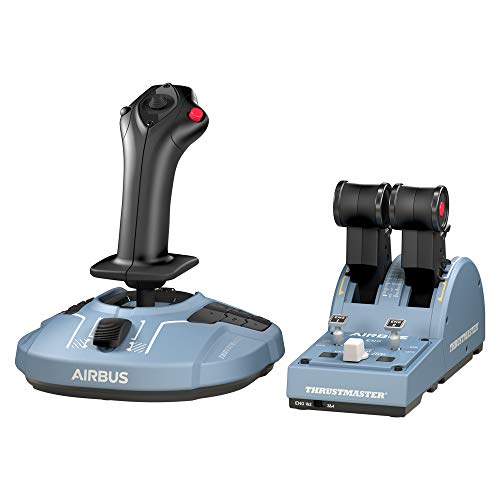
- Budget
- Hall-effect sensors
- PC
- 6 axes · 28 buttons
This page contains affiliate links. As an Amazon Associate we earn from qualifying purchases.
X-Plane 12 Performance Score
- Sensors30% 100
- Throttle & Rudder25% 100
- Build Quality15% 50
- Platforms15% 50
- Adjustability15% 57
Biggest contributor: sensors (30% of the score), rated 100/100. How we score
Verdict for X-Plane 12
The Thrustmaster TCA Officer Pack Airbus suits X-Plane 12 simmers flying the A320, pairing a 1:1 sidestick replica with its own throttle quadrant you can set for the climb and leave. The trade-off is plastic build, fixed spring tension and PC-only support.
Updated October 2026
Pros & Cons for X-Plane 12
Strengths
- The main axes use Hall effect sensors — contactless magnets instead of rubbing parts — so the center stays put and the nose doesn't drift when you click off the autopilot and hand-fly the last part of an approach.
- A lot of sticks for this money give you a tiny lever on the base and call it a throttle; here you get a separate Airbus-style throttle quadrant, so you can set climb thrust, leave it, and keep both hands where they belong during a busy departure.
- With 6 axes, 28 programmable inputs and an ambidextrous grip you can mount on the left like the real A320 seat, it fits simmers who live in airliners and want flaps, speedbrake, gear and views on the hardware — and it still has room to grow when you add rudder pedals later.
Trade-offs
- It is PC only: it won't work on Xbox or PS5, even with an adapter, so if you also sim away from the desktop this can't travel with you — for X-Plane 12 itself that's moot, since the sim is PC and Mac only.
- Spring tension is fixed and the body is plastic, so you can't firm up the center for a hand-flown crosswind landing or soften it for a long cruise leg; the next step up in price is where you find adjustable tension and metal construction.
Full Specifications
- Sensors
- Hall effect (contactless)
- Throttle
- Its own throttle unit
- Rudder
- Twist grip
- Grip
- Either hand (ambidextrous)
- Spring tension
- Fixed
- Build
- Plastic
- Axes
- 6
- Buttons
- 28
- Works on
- PC
- Released
- 2020
Frequently Asked Questions
Is this a good Flight Stick for X-Plane 12?
Yes, especially if your X-Plane 12 time is spent in airliners — it scores 78.5/100 for this sim. It shines on an Airbus line flight, where the licensed sidestick and the matching throttle quadrant let you set thrust and fly the profile without reaching for the keyboard. It shows its limits in aerobatics or tailwheel work, where fixed spring tension and a plastic shell give you less feel than stiffer, adjustable gear.
Is it worth the price for X-Plane 12?
For the money you're buying two devices, not one: a Hall-effect sidestick and a separate throttle quadrant, where plenty of alternatives give you a stick alone and leave the throttle to a second purchase. If Airbus flying is your thing in X-Plane 12, that pairing is the reason to pick it over a general-purpose stick.
Which platforms does it work on?
It is PC only, which lines up with X-Plane 12 running on Windows PC and Mac rather than Xbox or PS5. Worth knowing the rule only goes one way: console-licensed sticks generally still work on a PC, but this one won't work on a console even with an adapter, so plan it as a desktop setup.
Do I need rudder pedals with it?
No — the grip twists for rudder, so you can taxi, hold centerline and kick out drift on landing without pedals in the box. Pedals become worth adding once you fly crosswind approaches or hand-taxi a lot; when they arrive, unassign the twist axis in X-Plane so a wrist wobble while you pull back doesn't nudge the rudder.
How should I configure this in X-Plane 12?
First open the joystick page in X-Plane 12 and check both the sidestick and the quadrant show up as separate devices, then confirm pitch, roll, twist and each throttle lever are assigned to the right axis. If the nose feels twitchy, add a small null zone (a bit of slack around center where inputs are ignored) and soften the response curve on pitch and roll; also set the quadrant levers to the engines you actually fly, so a twin's thrust levers match rather than fighting each other.