VR Headset · X-Plane 12
Pimax Crystal Light VR Headset
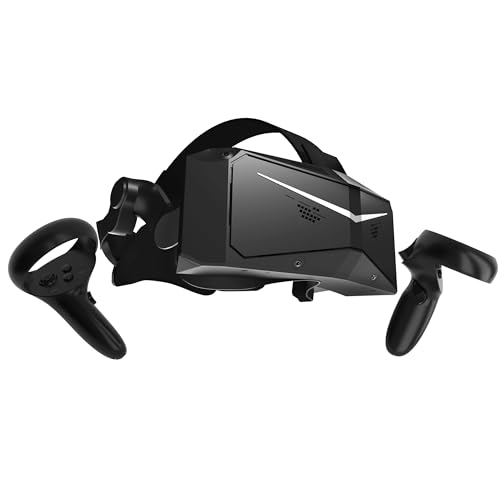
- High-End
- 35 pixels per degree
- DisplayPort cable
- PC
This page contains affiliate links. As an Amazon Associate we earn from qualifying purchases.
X-Plane 12 Performance Score
- Sharpness35% 61
- Lenses20% 100
- Refresh Rate15% 100
- No-Cable Freedom15% 50
- Platforms15% 50
Biggest contributor: sharpness (35% of the score), rated 61/100. How we score
Verdict for X-Plane 12
The Pimax Crystal Light suits X-Plane 12 pilots who want to read the radio stack without leaning in, at 35 pixels per degree. It is always tethered by a DisplayPort video cable from your graphics card, and that sharpness asks a lot of that card.
Updated October 2026
Pros & Cons for X-Plane 12
Strengths
- At 35 pixels per degree — a measure of how much fine detail fits into your view — the frequencies on the radio stack and the small labels above your head read straight off the panel on an X-Plane 12 approach, with no leaning in.
- Glass aspheric lenses stay sharp almost to the edge of the view, so the runway is still clear when you look over your shoulder on the turn to base, and the DisplayPort cable carries the picture to the headset uncompressed, with nothing squeezed out of thin scenery lines; the screen runs up to 120 Hz, so head movement stays smooth as you scan across the glareshield.
- It fits the desk-bound Windows simmer with a strong graphics card: an RTX 3080, 4070 or 5070 class card is the comfortable range, and that is the setup where the extra sharpness over a standalone headset actually shows in the cockpit.
Trade-offs
- There is no cable-free flying here: the DisplayPort video cable and a USB lead stay plugged in for the whole flight, so you need a free DisplayPort socket on the graphics card and a tidy cable route before you sit down for an hour in the circuit.
- All those pixels land on your graphics card, and X-Plane 12 leans hard on the GPU with its Vulkan renderer, so for the best experience Pimax points to an RTX 4070 Ti class card or faster; a simpler standalone headset skips the cable and goes easier on your card, while the next step up in price buys more pixels per degree again for the tiniest panel text.
Full Specifications
- Sharpness
- 35 pixels per degree
- Lenses
- Glass aspheric (sharp to the edge)
- Refresh rate
- Up to 120 Hz
- Type
- PC headset, wired by DisplayPort and USB
- Works on
- PC
- Released
- 2024
Frequently Asked Questions
Is this a good VR Headset for X-Plane 12?
Yes, if you fly X-Plane 12 on a Windows PC with a strong graphics card and you care about reading the panel, it scores 71.3/100 here. It shines on sharpness and lens quality: at 35 pixels per degree, with glass aspheric lenses that stay clear almost to the edge, you can read a frequency or judge the runway edge on short final without squinting. It shows its limits on freedom and on load: the cable never comes off, and the picture it draws is a lot of work for your graphics card.
Is it worth the price for X-Plane 12?
For the money you are buying sharpness and glass lenses rather than convenience, so it makes sense if cockpit text is the thing that puts you off VR today. Spend less and you get a lighter load on your graphics card and the option to fly without a cable; spend more and you mainly buy more pixels per degree.
What does it need to work?
It plugs into a Windows PC: a DisplayPort video cable straight from the graphics card, plus a USB cable, and X-Plane 12 then runs VR through SteamVR or Pimax's own PC app. It does not work on Xbox or PS5, and X-Plane 12 has no VR on Mac, so a PC is the only route.
What else do I need with it?
You need a Windows PC with a graphics card in the RTX 3080, 4070 or 5070 class to be comfortable, and an RTX 4070 Ti class card or faster if you want to lean on all 35 pixels per degree. Check you have a spare DisplayPort socket on the card itself, and set up a yoke, stick or hotas you can find by feel, since you cannot see your desk once the headset is on.
How should I configure this in X-Plane 12?
Install and run Pimax's PC app first and set it as the OpenXR runtime, the bit of software that lets the sim talk to the headset, then open X-Plane 12's settings, enable VR hardware and put the headset on. Start with lower graphics settings and raise them one at a time, and plug the DisplayPort cable straight into the graphics card.