For most people flying on a PC, get a Meta Quest 3. It's sharp, easy to set up, and works by cable or Wi-Fi. On a tight budget, the Quest 3S. If you have a high-end graphics card and want to read every gauge, a wired Pimax. On a PS5, the PS VR2 is the only option. Xbox and Mac have no VR for flight sims.
 Best for most simmersMeta Quest 3
 Best on a budgetMeta Quest 3S
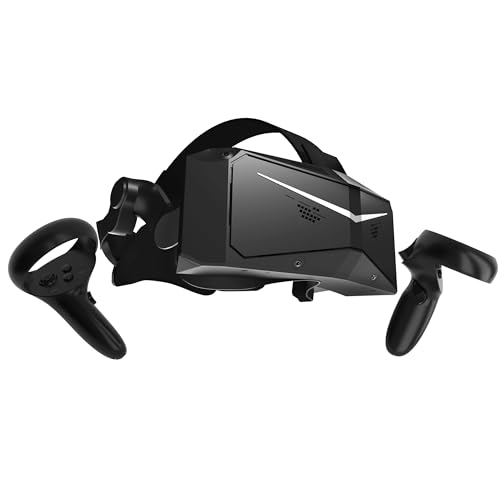 Sharpest for the moneyPimax Crystal Light
 Sharpest you can buyPimax Crystal Super (57 PPD)
 Best for PS5PlayStation VR2
Not sure which fits you? Answer up to four quick questions about your setup and budget, and we'll match you to a headset and tell you what else you'll need.
Which VR headset fits you?
Question 1 of 4
The types of VR headsets
There are three kinds of VR headset that can fly a sim today. What sets them apart is how the picture gets to your eyes:
-
Streams from your PCStandalone
Has its own chip and battery, so it also works with no PC. For flight sims, your PC draws the picture and sends it over Wi-Fi or a USB cable. Meta Quest 3, Quest 3S, Steam Frame.
-
Wired to your graphics cardPC-tethered
No chip of its own: a DisplayPort cable runs to your graphics card. The picture isn’t compressed, so it’s the sharpest, but you’re always plugged in. Pimax Crystal Light, Crystal Super, Bigscreen Beyond 2.
-
Plugs into a PS5Console
One USB-C cable to a PS5, where MSFS 2024 supports it. With Sony’s adapter it also works on a PC. PlayStation VR2.
Standalone headsets (that stream from your PC)
A standalone headset has its own chip and battery, so it works on its own for VR games and apps. But no headset chip can run Microsoft Flight Simulator or X-Plane. For those, your PC draws the picture and streams it to the headset, over a USB cable or your Wi-Fi.
- Examples: Meta Quest 3, Meta Quest 3S, and Valve's Steam Frame (released September 2026, sold only on Steam).
- Good: easy setup, no sensors to mount, can go wireless, and the best value.
- Not so good: the picture is compressed on the way to the headset, so it's never quite as crisp as a wired one, and wireless needs a strong Wi-Fi setup.
PC-tethered headsets
A tethered headset is just screens, lenses and sensors. A DisplayPort cable runs straight to your graphics card, so the picture arrives uncompressed. That's why the sharpest headsets are tethered.
- Examples: Pimax Crystal Light, Pimax Crystal Super, Bigscreen Beyond 2 (sold only by Bigscreen).
- Good: the sharpest picture you can get, and no streaming glitches.
- Not so good: you're always plugged in, they cost more, and they need a strong graphics card to drive all those pixels.
Console headsets
The PlayStation VR2 plugs into a PS5 with one USB-C cable. Since April 2026, MSFS 2024 supports it on PS5 and PS5 Pro. With Sony's PC adapter it also works on a Windows PC, though without its eye tracking and HDR. Xbox has never had VR.
What doesn't work for flight sims
- Phone headsets (Google Cardboard, Samsung Gear VR) can't run a flight sim, and they're no longer made.
- Windows Mixed Reality headsets, like the HP Reverb G2 that simmers loved, stopped working out of the box when Microsoft removed Windows Mixed Reality in Windows 11 version 24H2. More in headsets to avoid.
Which sims and platforms support VR
VR in flight sims is a PC thing first, with one console exception:
| Windows PC | PS5 | Xbox | Mac | |
|---|---|---|---|---|
| MSFS 2024 | Yes, any PC headset | Yes, PS VR2 (since April 2026) | No | Doesn't run on Mac |
| MSFS 2020 | Yes, any PC headset | Not on PS5 | No | Doesn't run on Mac |
| X-Plane 12 | Yes, through SteamVR or Meta's PC app | Not on PS5 | Not on Xbox | No VR on Mac |
On a PC, both versions of MSFS work with any headset whose software supports OpenXR, the common VR standard. That covers every current PC headset. X-Plane 12 rebuilt its VR in version 12.4.3 (June 2026): your real hands can work the switches on headsets with hand tracking, mixed reality shows your real yoke and throttle inside the virtual cockpit, and headsets with eye tracking can render sharp only where you look. It can also stream to an Apple Vision Pro, but the sim still runs on a Windows PC with an Nvidia graphics card.
Other PC sims that support VR include DCS World, IL-2 Sturmovik and Aerofly FS 4. Weighing up the sims themselves? See X-Plane 12 vs MSFS 2024 or the best flight simulators of 2026.
Is VR worth it for flight sims?
Our take: for most simmers, yes, once you can fly the basics on a screen. Nothing else gives you the sense of sitting in the aircraft. But it isn't better at everything.
What VR does better than any screen:
- Size and distance. You feel how big an airliner is and how high you are. Judging the flare on landing gets easier, because you have real depth.
- Looking around. Check traffic, look over your shoulder on a turn to final, watch the skids of a helicopter in a hover. You just turn your head.
- Being there. Flying low through a valley or over your own town is breathtaking in VR.
Where it falls short:
- Sharpness. Small cockpit text is softer than on a good monitor (see what to look for).
- It's demanding. A headset asks your graphics card for several times the work of a monitor (see what PC you need).
- You can't see your desk. Keyboard, mouse and checklists are hard to use. You learn your controls by feel, or use mixed reality where it's supported.
- Comfort. On long flights a headset gets warm and heavy.
Best in VR: small planes, bush flying, helicopters, sightseeing and anything low and slow. Least suited: long airline flights with a lot of typing into flight computers. Some simmers fly the busy parts on a screen and the scenic parts in VR.
Our VR headset picks
Five headsets, ranked for flight sims. Every one works in MSFS 2024, MSFS 2020 and X-Plane 12 on a PC. Specs are each maker's own.
Best for most simmers
Meta Quest 3
Standalone, streams from your PC · Windows PC
The headset we'd buy for flight sims today. Its pancake lenses keep gauges sharp across the whole view, it connects by cable or Wi-Fi, and it works on its own for other VR games.
- Sharpness
- 25 pixels per degree
- Connects
- USB-C cable or Wi-Fi
- Graphics card
- RTX 3080 / RX 6800 XT class for MSFS 2024
- Budget
- $500 to $1,000
Pros
- Sharp from edge to edge, so side panels stay readable
- Cable or wireless, with no sensors to mount
- Also a standalone headset for other VR games
Cons
- Cockpit text is softer than on a Pimax
- Front-heavy with the stock strap; a battery strap balances it
Skip it if you have a high-end PC and reading the smallest text matters most: a Pimax is much sharper.
Check price on AmazonBest on a budget
Meta Quest 3S
Standalone, streams from your PC · Windows PC
The cheapest good way to try VR flying. It has the same chip and PC connection as the Quest 3, but its older-style lenses are only sharp in the middle, so you turn your head to read side panels.
- Sharpness
- 20 pixels per degree
- Connects
- USB-C cable or Wi-Fi
- Graphics card
- RTX 3080 / RX 6800 XT class for MSFS 2024
- Budget
- Under $500
Pros
- The lowest-cost way into VR flight sims
- Same cable and Wi-Fi options as the Quest 3
- Works on its own for other VR games
Cons
- Sharp only in the center of the lens
- The softest cockpit text of our picks
Skip it if you can stretch to the Quest 3: its lenses are the biggest upgrade for flying.
Check price on AmazonSharpest for the money
Pimax Crystal Light
PC-tethered · Windows PC
A big jump in sharpness: 35 pixels per degree, so most cockpit labels read without leaning in. It's wired to your graphics card by DisplayPort, and it needs a strong one.
- Sharpness
- 35 pixels per degree
- Connects
- DisplayPort + USB
- Graphics card
- RTX 3080, 4070 or RX 6800 XT class (Pimax)
- Budget
- $500 to $1,000
Pros
- Much sharper than any Quest
- Uncompressed picture straight from the graphics card
- Built-in tracking: no sensors to mount
Cons
- Always wired to the PC
- Asks a lot more of your graphics card
- Pimax's software has more settings to learn
Skip it if your graphics card is below an RTX 3080 / RX 6800 XT, or you want to fly without a cable.
Check price on AmazonSharpest you can buy
Pimax Crystal Super (57 PPD)
PC-tethered · Windows PC
The sharpest headset you can buy on Amazon. At 57 pixels per degree, small gauges and cockpit screens read close to a monitor. It needs a top-end PC to feed it.
- Sharpness
- 57 pixels per degree
- Connects
- DisplayPort + USB
- Graphics card
- RTX 4070 Ti, 4080, 4090 or RX 7900 XT and up (Pimax)
- Budget
- Over $1,500
Pros
- The sharpest picture in VR, close to 20/20 vision
- Eye tracking, for sharper rendering where you look in sims that support it
- Swappable lens sets if you want a wider view later
Cons
- Needs an RTX 4070 Ti class card or faster, and 32GB of RAM
- A big spend, wired, and 90Hz at most
Skip it if your PC isn't high end: a Crystal Light gives you most of the gain for far less.
Check price on AmazonBest for PS5
PlayStation VR2
Console (PS5) · PS5 (PC with Sony's adapter)
The only VR headset for a PS5. MSFS 2024 has supported it since April 2026, every aircraft works in VR, and the Sense controllers that come with it work the switches.
- Sharpness
- 2000 × 2040 per eye
- Connects
- One USB-C cable (PS5)
- Graphics card
- None on PS5. On PC: RTX 3060 / RX 6600 XT or better (Sony)
- Budget
- Under $500
Pros
- One cable to the PS5, nothing else to buy
- OLED screens with deep blacks, lovely at night
- Also works on a PC with Sony's adapter
Cons
- Fresnel lenses: sharp only in the middle
- On a PC: no eye tracking, HDR or headset rumble
Skip it if you fly on a PC and don't own a PS5: a Quest 3 is simpler and sharper.
Check price on Amazon
Buttons go to Amazon, where you’ll see today’s price and stock. As an Amazon Associate we earn from qualifying purchases; it never changes what we recommend. Specs are each maker’s own, checked October 2026.
All five side by side:
| Headset | Type | Pixels per degree | Resolution per eye | Lenses | Refresh rate | Connects | Flight sims | Budget |
|---|---|---|---|---|---|---|---|---|
| 1Quest 3 | Standalone, streams from your PC | 25 | 2064 × 2208 | Pancake | 72–120Hz | USB-C cable or Wi-Fi | MSFS 2024, MSFS 2020, X-Plane 12 | $500 to $1,000 |
| 2Quest 3S | Standalone, streams from your PC | 20 | 1832 × 1920 | Fresnel | 72–120Hz | USB-C cable or Wi-Fi | MSFS 2024, MSFS 2020, X-Plane 12 | Under $500 |
| 3Crystal Light | PC-tethered | 35 | 2880 × 2880 | Glass aspheric | 72–120Hz | DisplayPort + USB | MSFS 2024, MSFS 2020, X-Plane 12 | $500 to $1,000 |
| 4Crystal Super | PC-tethered | 57 | 3840 × 3840 | Glass aspheric (57 PPD set) | 72–90Hz | DisplayPort + USB | MSFS 2024, MSFS 2020, X-Plane 12 | Over $1,500 |
| 5PS VR2 | Console (PS5) | Not published | 2000 × 2040 | Fresnel | 90–120Hz | One USB-C cable (PS5) | MSFS 2024 on PS5; on PC, all three | Under $500 |
Want the scores for each headset in a specific sim? See our ranked VR headsets for MSFS 2024 and for X-Plane 12.
What to look for in a VR headset for flying
Flight sims test a headset differently from action games. You sit still, and you spend a lot of time reading small labels. In order of importance:
1. Sharpness (pixels per degree). This decides whether you can read a frequency or an altitude without leaning in. Resolution alone can mislead, because a wider view spreads the same pixels further. Pixels per degree (PPD) accounts for that:
- Meta Quest 3SFresnel lenses 20 PPD
- Meta Quest 3Pancake lenses 25 PPD
- Pimax Crystal LightGlass aspheric lenses 35 PPD
- Pimax Crystal Super57 PPD lenses 57 PPD
- 20/20 visionRule of thumb About 60 PPD
2. Lenses. Newer pancake and glass aspheric lenses stay sharp almost to the edge. Older Fresnel lenses (Quest 3S, PS VR2) are sharp only in the middle, so you turn your head to read a side panel, and you may see faint glare rings around bright text.
3. Comfort. You'll sit in it for an hour or more. Weight matters less than balance: a headset that pulls forward gets tiring. A rigid strap with a counterweight or battery at the back helps a lot.
4. How it connects. Wireless is freeing, but in a seated cockpit a cable is barely in the way. A cable gives the steadiest picture. If you go wireless, plan on a Wi-Fi 6E router in the same room.
5. Refresh rate. 90Hz is the sweet spot for flight sims. Higher numbers only help if your PC can keep up, and in MSFS few PCs can.
6. Eye tracking. Lets the sim draw full detail only where you're looking, which saves graphics power. X-Plane 12 supports it since 12.4.3; for other sims it depends on the headset's software. It's on the PS VR2 (on PS5) and the Crystal Super, not on the Quests.
7. Glasses. Most headsets fit glasses, but lens inserts with your prescription are more comfortable and protect the headset's lenses from scratches.
What PC you need for VR flight sims
The graphics card matters most. A headset needs two images, one per eye, at high resolution and 72 to 90 times a second. Here's how that compares with a monitor:
- 1440p monitor2560 × 1440 at 60 fps 1×
- 4K monitor3840 × 2160 at 60 fps 2.3×
- Meta Quest 3Two 2064 × 2208 at 90 Hz 3.7×
- Pimax Crystal LightTwo 2880 × 2880 at 90 Hz 6.8×
- Pimax Crystal SuperTwo 3840 × 3840 at 90 Hz 12.0×
Microsoft publishes no separate VR spec for MSFS 2024, so we use headset makers' recommendations. Pimax's are the most detailed for flight sims:
| Graphics cards | Where the line comes from | |
|---|---|---|
| Starting point | RTX 2070 to 3070, 4060, 5060; RX 5700 XT, 6700 XT | Pimax's minimum for the Crystal Light. Above the bare minimums from Meta and Sony. |
| Comfortable | RTX 3080, 3090, 4070, 5070; RX 6800 XT, 9070 | Pimax's recommendation for the Crystal Light and for MSFS 2024 in VR |
| Best | RTX 4070 Ti, 4080, 4090, 5070 Ti and up; RX 7900 XT, 9070 XT | Pimax's "best experience" list and the Crystal Super's recommendation |
Pimax lists RTX 40 and older cards. We placed the newer RTX 50 and RX 9000 cards in each group by how they compare in independent tests. That placement is our call.
Beyond the graphics card:
- Processor. MSFS leans hard on the CPU, in VR even more. Pimax's MSFS 2024 VR guide asks for a Ryzen 7 5800X or Core i7-12700K class chip or better. See our CPUs ranked for MSFS.
- Memory. 32GB of RAM. It's Microsoft's recommendation for MSFS 2024 and Pimax's for the Crystal Super.
- Graphics memory. Microsoft's "Ideal" MSFS 2024 spec asks for 12GB (an RTX 4080 or RX 7900 XT). Headsets push memory use up, so 12GB or more is the safe choice for VR.
- Ports. A tethered headset needs a free DisplayPort on the graphics card. A Quest on a cable needs a fast USB 3 port.
Not sure what's in your PC? On Windows, press Ctrl + Shift + Esc, open the Performance tab and click GPU. The name is at the top right.
Shopping for a faster PC or card? See our graphics cards ranked for MSFS and for X-Plane 12, prebuilt PCs for MSFS, or our three PC builds, including a 4K and VR build.
What else you need
Depending on the headset, a few extras make a real difference:
What else you need: our picks
| Part | Our pick | Price |
|---|---|---|
| Link cable (Quest) Connects a Quest to your PC by USB: the steadiest, sharpest PC picture, and it charges as you fly. | Syntech Link Cable, 16 ft (USB 3.0) Plug it into a USB 3 port on the back of the PC. 16 feet reaches from a desk to a cockpit seat. | Check price |
| Wi-Fi 6E router (Quest, wireless) Gives the headset its own fast, uncrowded Wi-Fi link to the PC. | TP-Link Archer GXE75 Wi-Fi 6E Router Wire the PC to the router by Ethernet and keep the router in the room where you fly. | Check price |
| Battery strap (Quest) A rigid strap with a battery at the back: balances the front-heavy headset and adds battery life. | Meta Quest Elite Strap with Battery The single best comfort upgrade for long flights on a Quest 3 or 3S. | Check price |
| PS VR2 PC adapter Lets a PS VR2 work on a Windows PC through SteamVR. | Sony PlayStation VR2 PC Adapter Only if you already own a PS VR2. You also need a DisplayPort 1.4 cable, plus Bluetooth for the Sense controllers. | Check price |


Links go to Amazon, where you'll see today's price. As an Amazon Associate we earn from qualifying purchases, at no cost to you.
Your flight controls work in VR as they are. A stick, yoke, throttle and pedals are what you fly with, and in VR you'll use them by feel. Pick controls with the main buttons where your hands fall. Our controller guide covers what works on PC, Xbox and PS5. To build up a full setup, see how to build a home cockpit.
Setting up VR in MSFS 2024 and X-Plane 12
Meta Quest 3 or 3S on a PC:
- Install the Meta Horizon Link app on your PC and sign in.
- Connect the headset with a Link cable, or set up Air Link over Wi-Fi. Valve's free Steam Link app and the paid Virtual Desktop app are other wireless options.
- In the Link app's settings, set Meta Horizon Link as the active OpenXR runtime.
- MSFS: start the sim on your monitor, load a flight, then press Ctrl + Tab (Toggle VR Mode). If nothing happens, check that the control is assigned in the sim's controls settings.
- X-Plane 12: open the settings, find the VR section, and enable VR with the headset connected.
Pimax: install Pimax Play, plug the DisplayPort and USB cables into the PC, then enter VR the same way as above.
PS VR2 on a PS5: plug the headset into the PS5, start MSFS 2024, and switch to VR mode.
Tips for comfortable VR flights
- Set the lens distance to your eyes (IPD) first. Wrong spacing causes blur and eye strain.
- A steady frame rate beats pretty graphics. If the picture stutters, lower clouds, terrain detail or traffic before anything else. Stutter is what makes people queasy.
- Start with short flights. Many people find seated cockpit VR easy, but give yourself a few sessions to adjust.
- Keep sunlight off the lenses. Lenses focus sunlight onto the screens and can burn them. Never leave a headset facing a window.
- Keep cool. A small desk fan pointed at you makes long flights much nicer.
- Learn the cockpit by feel. Practice finding your main switches without looking down. It pays off in VR.
Headsets to avoid in 2026
- HP Reverb G2 and other Windows Mixed Reality headsets. Windows 11 version 24H2 removed Windows Mixed Reality, so these no longer work out of the box. Community workarounds exist, but a used one is a project, not a bargain.
- Valve Index. Valve stopped making it in November 2025, replacing it with the Steam Frame. The listings you'll see now are used or third-party.
- Varjo Aero. Discontinued, and Varjo ended software support on January 1, 2026.
- Meta Quest 2 and Quest Pro. Discontinued in 2024. A used Quest 2 still works, but the Quest 3S is the newer, better buy.
- Phone headsets. They can't run a flight sim.
Not ready for VR? Head tracking and screens
If VR isn't for you yet, because of your PC, comfort or how much you read in the cockpit, head tracking gets you much of the "look around" for less. A sensor on your monitor follows small head turns and swings the view in the sim. Microsoft names both of these as options for MSFS:
Not ready for VR: head tracking
| Part | Our pick | Price |
|---|---|---|
| Head tracker (PC) A small camera on your monitor follows your head: turn a little, and the view turns a lot. | TrackIR 5 with TrackClip PRO The long-time favorite of desk simmers, supported in MSFS 2024 and MSFS 2020. | Check price |
| Head and eye tracker (PC) Sits under your monitor and tracks your head with nothing to wear. | Tobii Eye Tracker 5 Nothing on your head or cap, so it suits glasses wearers and quick sessions. | Check price |


Links go to Amazon, where you'll see today's price. As an Amazon Associate we earn from qualifying purchases, at no cost to you.
Head tracking works on Windows PCs only. Bigger or multiple screens are the other route: see the screens step in our home cockpit guide.
The bottom line
- Most PC simmers: Meta Quest 3. Start on a cable, add a battery strap.
- Tight budget: Meta Quest 3S. Upgrade to sharper lenses later if VR hooks you.
- High-end PC, want to read everything: Pimax Crystal Light, or the Crystal Super if your PC is top end.
- PS5: PlayStation VR2 with MSFS 2024.
- Xbox or Mac: no VR for flight sims. Head tracking (on a Windows PC) or a bigger screen are the alternatives.
Whatever you buy, check your graphics card first. In VR it matters as much as the headset.
Where this comes from
We don't run lab tests. Specs, prices for sims, platform support and PC requirements come from the makers (Meta, Pimax, Sony, Valve, Microsoft and Laminar Research) and the sims' release notes, checked October 7, 2026. Which headset suits whom is our judgment, and it's labeled that way. Product links go to Amazon, and we earn a commission on purchases at no cost to you. Spotted something out of date? Tell us.