Throttle Quadrant · Microsoft Flight Simulator 2024
Honeycomb Bravo

- Mid-Range
- 6 levers
- PC and Xbox
MSFS Performance Score
- Throttle & Rudder35% 100
- Sensors20% 40
- Detent Feel15% 40
- Platforms15% 100
- Build Quality15% 50
Biggest contributor: throttle and rudder (35% of the score), rated 100/100. How we score
Verdict for MSFS
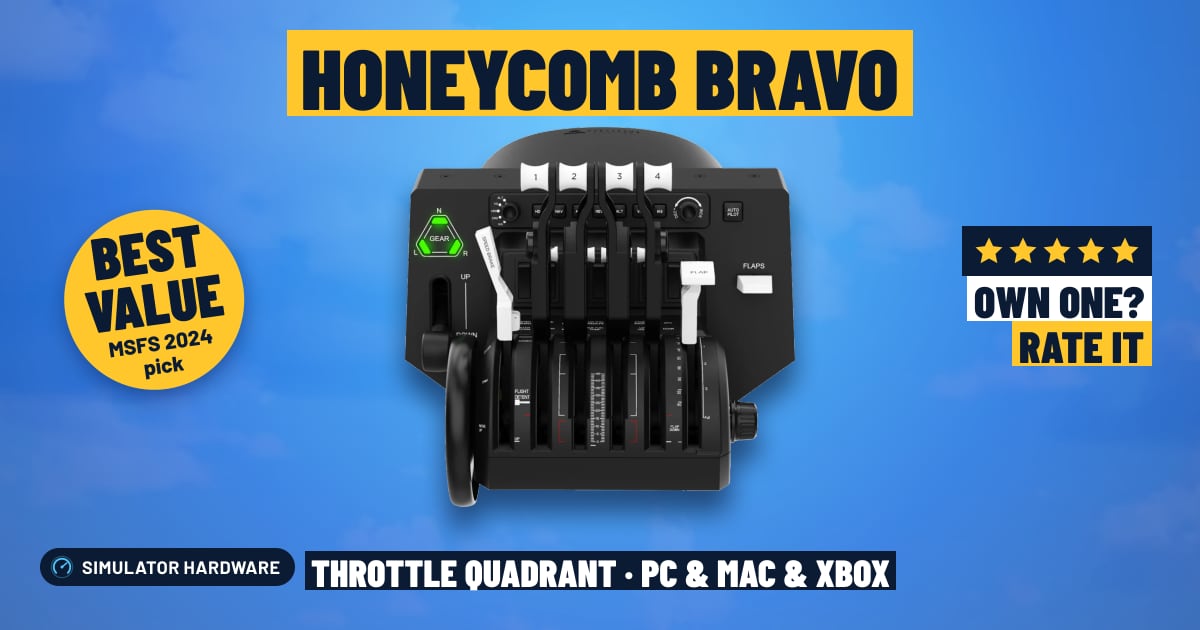
The Honeycomb Bravo suits simmers who fly everything from a Cessna to a four-engine airliner, with six levers and swappable handles so each one can be throttle, prop or mixture. The trade-off: Honeycomb doesn't say the levers use contactless sensors, and on Xbox it needs the Xbox Hub.
Updated October 2026
Pros & Cons for MSFS
Strengths
- Six levers with swappable handles cover almost anything in MSFS: four throttles for a four-engine airliner on a long climb, or throttle, prop and mixture in a Cessna so you can lean the mixture (thin the fuel-air mix) as you level off at cruise.
- The autopilot controls, trim wheel, landing gear lever and flap lever keep your hands off the keyboard on an ILS approach — set the heading, drop the gear, run the flaps down — and the annunciator panel's warning lights sit in your eyeline when something trips.
- It fits the simmer who already flies with a yoke and wants the rest of the center pedestal, since on PC it's a USB plug-in and MSFS loads a ready-made control profile for it.
Trade-offs
- On Xbox it doesn't plug into the console: it connects to Honeycomb's Xbox Hub alongside the Alpha XPC yoke, so if you're on a console without that setup, this quadrant isn't an option for your MSFS flying.
- Honeycomb doesn't mention detents — the notches that let you pull the levers back to a set climb power after takeoff without looking down — and doesn't state contactless sensors, so if an axis gets twitchy with age you'll be recalibrating or adding a small dead zone; the next step up in price is where marked detents and contactless sensors show up.
Full Specifications
- Type
- Configurable for any aircraft
- Levers
- 6
- Detents
- Not stated
- Extra controls
- autopilot, trim wheel, gear lever, flap lever, annunciator panel
- Sensors
- Not stated by the maker
- Works on
- PC, Mac, Xbox
- On Xbox
- Plugs into Honeycomb's Xbox Hub (with the Alpha XPC)
- Released
- 2020
Frequently Asked Questions
Is this a good Throttle Quadrant for MSFS?
Yes, for simmers who fly a mix of singles, twins and airliners in MSFS 2024 — it scores 71.5/100 for the sim. It shines when you want the whole pedestal under one hand: six levers for a four-engine start-up, plus autopilot, trim, gear and flaps for the approach. It shows its limits for airline purists, since Honeycomb doesn't list detents for climb power or a reverse-thrust position on the landing roll.
Is it worth the price for MSFS?
For the money you're getting the lever count and the autopilot, trim, gear and flap controls in one unit, which is more cockpit than a plain throttle axis gives you. Spend less and you get fewer levers and no autopilot panel; spend more and you're paying for contactless sensors and marked detents rather than extra controls.
Does it work on Xbox or PS5?
On PC it's a straight USB connection and MSFS 2024 picks it up with a ready-made control profile. On Xbox Series X|S it plugs into Honeycomb's Xbox Hub alongside the Alpha XPC yoke rather than the console itself, and on PS5 no separate quadrant is supported at all.
What else do I need with it?
Pair it with a yoke for airliners and light twins, or a stick if you fly GA and fighters, and add rudder pedals so you can hold the centerline in a crosswind landing. Mount it to the side your throttle hand naturally falls on — usually to the right of a yoke — and get it close, so reaching for the flap lever on short final doesn't mean leaning forward.
How should I configure this in MSFS?
In MSFS, assign each lever to its own axis — throttle, propeller, mixture, flaps or speed brake — then check the ready-made profile loaded before you fly, and fix anything the aircraft needs differently. Swap the lever handles to match what you're flying, and if a lever flickers at idle, recalibrate or set a small dead zone so the engine doesn't surge on the taxiway.