Flight Stick · Microsoft Flight Simulator 2024
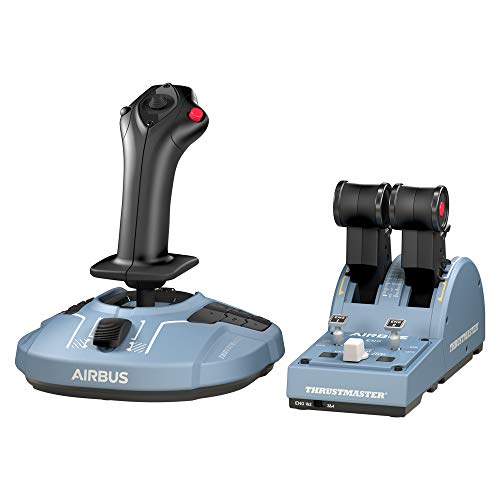
Thrustmaster TCA Officer Pack Airbus Edition (Sidestick + Throttle Quadrant)
- Budget
- Hall-effect sensors
- PC
- 6 axes · 28 buttons
This page contains affiliate links. As an Amazon Associate we earn from qualifying purchases.
MSFS Performance Score
- Sensors30% 100
- Throttle & Rudder25% 100
- Build Quality15% 50
- Platforms15% 50
- Adjustability15% 57
Biggest contributor: sensors (30% of the score), rated 100/100. How we score
Verdict for MSFS
The Thrustmaster TCA Officer Pack Airbus suits Airbus flyers on PC: a 1:1 A320 sidestick replica with a separate throttle quadrant you can set for the climb and leave. Rudder comes from twisting the grip, spring tension is fixed, and it won't work on Xbox or PS5.
Updated October 2026
Pros & Cons for MSFS
Strengths
- Hall-effect sensors on the main axes read the stick with magnets instead of rubbing parts, so the center stays put and the nose doesn't drift when you click off the autopilot on short final.
- A lot of what else this money buys is a single stick with a small thumb lever; here you get a dedicated throttle quadrant, so you can set climb power on the A320 and leave it alone while you trim and watch the speed.
- The ambidextrous grip can be set up for the left hand like an A320 captain's sidestick, and with 6 axes and 28 programmable inputs you can map flaps, autopilot and lights without reaching for the keyboard; add rudder pedals later and the twist axis can step aside.
Trade-offs
- PC only: it won't work on Xbox Series X|S or PS5, even with an adapter, so console simmers flying MSFS should look elsewhere (PS5 only speaks to a few Thrustmaster controls such as the T.Flight Hotas 4 and 5 and the PS5 TCA Sky Yoke).
- The next step up in price brings adjustable spring tension and metal construction; this one has fixed tension and a plastic body, and rudder comes from twisting the grip rather than pedals, which is fiddly when you're holding a bank and feeding in yaw on a crosswind landing.
Full Specifications
- Sensors
- Hall effect (contactless)
- Throttle
- Its own throttle unit
- Rudder
- Twist grip
- Grip
- Either hand (ambidextrous)
- Spring tension
- Fixed
- Build
- Plastic
- Axes
- 6
- Buttons
- 28
- Works on
- PC
- Released
- 2020
Frequently Asked Questions
Is this a good Flight Stick for MSFS?
Yes, especially if you fly the Airbus jets in MSFS on a PC, and it scores 78.5/100 for the sim. The contactless Hall-effect sensors hold a steady center for hand-flown approaches, and the separate throttle quadrant gives you real levers for climb and descent power. It shows its limits if you want adjustable spring tension, metal parts or proper rudder pedals in the box.
Is it worth the price for MSFS?
For the money you're getting contactless sensors, a dedicated Airbus-style throttle quadrant and a lot of programmable inputs, where much of the competition gives you one stick with a thumb throttle. If you mostly fly Airbus airliners on PC, that combination is hard to argue with; if you fly warbirds or helicopters, a different layout may suit you better.
Does it work on Xbox or PS5?
It's PC only for MSFS, over USB on Windows, and it will not work on Xbox Series X|S or PS5 even with an adapter. Consoles only accept licensed controls, and Xbox Cloud Gaming doesn't support flight sticks at all, so plan on flying at the PC with this one.
Do I need rudder pedals with it?
No, you don't need pedals to start, because the grip twists to give you rudder for taxiing and small yaw corrections. Pedals become worth adding once you're lining up on the centerline in a crosswind or taxiing tight ramps; when you do, put a dead zone on the twist axis or unbind it so you don't yaw by accident while banking.
How should I configure this in MSFS?
Plug it in first and check that MSFS has loaded a control profile for it, then confirm the throttle quadrant levers and the twist axis are all assigned where you want them. If the twist feels twitchy on rollout, add a small dead zone and soften the sensitivity curve on that axis, and set the quadrant levers up as separate engine axes on the A320 so you can nudge one engine at a time.