Rudder Pedals · X-Plane 12
Honeycomb Charlie Rudder Pedals
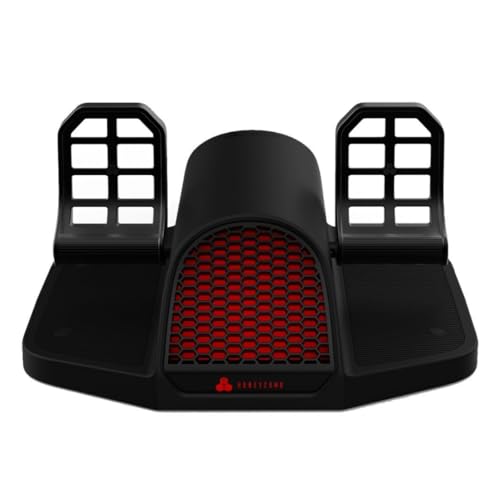
- Mid-Range
- Hall-effect sensors
- Toe brakes
- PC and Xbox
This page contains affiliate links. As an Amazon Associate we earn from qualifying purchases.
X-Plane 12 Performance Score
- Sensors25% 100
- Adjustability25% 100
- Build Quality20% 90
- Platforms15% 100
- Toe Brakes15% 100
Biggest contributor: sensors (25% of the score), rated 100/100. How we score
Verdict for X-Plane 12
The Honeycomb Charlie Rudder Pedals suit X-Plane 12 pilots who want their feet on the rudder, with contactless Hall effect magnetic sensors reading the small inputs that hold the centerline. They're heavy and wide, about 50 cm (19.6 in) across, so clear the floor space first.
Updated October 2026
Pros & Cons for X-Plane 12
Strengths
- The Hall effect sensors read pedal position with magnets instead of rubbing contacts, so the tiny pushes that keep the nose on the centerline during a gusty crosswind takeoff roll arrive as clean, repeatable movement rather than steps — and X-Plane 12 lets you shape the response curve on that rudder axis to taste.
- Left and right toe brakes work separately, which is what lets you brake one wheel to swing a taildragger around on the ramp or hold a tight turn onto a narrow taxiway to the gate; the belt linking the two pedals keeps them moving together so your heels stay square while you do it.
- They finish a Honeycomb Alpha yoke and Bravo throttle setup on PC, and the adjustable spring tension plus adjustable pedals mean you can set them light for constant small corrections in a helicopter hover or firmer for long IFR legs in a twin.
Trade-offs
- At 7.3 kg (16 lb) and roughly 50 cm (19.6 in) across, they need real floor room under the desk, and you'll want the included carpet spikes in place before you lean on the brakes during a short-field landing, or the whole set walks forward.
- You're paying for a metal frame, contactless sensors, adjustable tension and Xbox capability — and X-Plane 12 only runs on Windows and Mac, so the console side does nothing for you here. Simpler pedals skip all of that and cost less for the money.
Full Specifications
- Sensors
- Hall effect (contactless)
- Toe brakes
- Yes, left and right
- Adjustable tension
- Yes
- Adjustable pedals
- Yes
- Mechanism
- Belt drive
- Build
- Metal
- Works on
- PC, Mac, Xbox
- On a console
- Plugs into Honeycomb's Xbox Hub (with the Alpha XPC)
- Released
- 2024
Frequently Asked Questions
Is this a good Rudder Pedals for X-Plane 12?
Yes — they score 98.0/100 for X-Plane 12 and suit anyone moving up from twisting a stick grip or tapping keys for rudder. They shine in the moments where yaw (the nose swinging left or right) matters most: holding the centerline on the roll, kicking straight in a crosswind landing, keeping the ball centered in a climbing turn, and steering with differential toe brakes on the ground. The limits are practical rather than technical — they're big, heavy, and built with an Xbox route that X-Plane 12 can't use.
Is it worth the price for X-Plane 12?
For the money you get contactless Hall effect sensors, a metal frame, separate toe brakes and adjustable spring tension, which is the full set of things simmers end up wanting later. Spend less and you can give up one or more of those; the next step up in price mostly buys you different mounting and hardware styles rather than a better rudder axis.
What does it need to work?
For X-Plane 12 they plug straight into a Windows PC or a Mac over USB, which is all you need since the sim doesn't run on Xbox or PS5. The Xbox route exists — there they work through Honeycomb's Alpha XPC yoke and Honeycomb's Xbox Hub rather than the console itself — but that path is irrelevant if X-Plane 12 is what you fly.
What else do I need with it?
Pair them with a yoke or a stick and a throttle so your hands and feet each have a job; a Honeycomb Alpha yoke and Bravo throttle on PC is the setup they were built around. On the floor, use the carpet spikes that come in the box, or a mat or a seat rig on hard flooring, and set your chair so your heels rest naturally on the pedal tops without stretching.
How should I configure this in X-Plane 12?
In X-Plane 12, assign the rudder axis and each toe brake as its own axis, then turn off the auto-rudder assist so the sim stops steering for you. If the nose twitches, add a small null zone or soften the curve on the rudder axis only, and set the spring tension and the pedal adjustment to your legs before you calibrate, not after.