Rudder Pedals · Microsoft Flight Simulator 2024
Turtle Beach VelocityOne Rudder Pedals
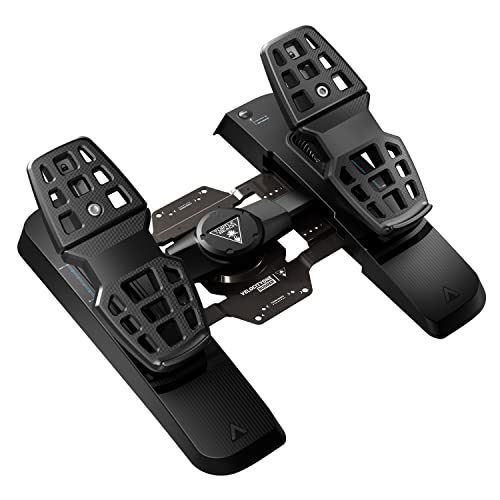
- Mid-Range
- Hall-effect sensors
- Toe brakes
- PC and Xbox
This page contains affiliate links. As an Amazon Associate we earn from qualifying purchases.
MSFS Performance Score
- Sensors25% 100
- Adjustability25% 100
- Build Quality20% 50
- Platforms15% 100
- Toe Brakes15% 100
Biggest contributor: sensors (25% of the score), rated 100/100. How we score
Verdict for MSFS
The Turtle Beach VelocityOne Rudder suits anyone flying MSFS who still steers with a twist grip, adding contactless Hall-effect sensors that read your rudder input without parts touching. On Xbox they connect through the VelocityOne Flight, not the console itself.
Updated October 2026
Pros & Cons for MSFS
Strengths
- The Hall-effect sensors read pedal position with magnets instead of rubbing contacts, so the small, repeated pushes that hold the centerline during a gusty crosswind takeoff roll land in the same place every time instead of drifting or stepping.
- Left and right toe brakes work separately (differential braking, meaning you can brake one wheel at a time), so you can pivot a taildragger around on the ramp, hold the nose straight after touchdown, or ease into a tight turn while taxiing to the gate.
- Adjustable spring tension and adjustable pedals mean you can set them light for the constant small corrections of a helicopter hover and firmer for an airliner, and on Xbox they finish a VelocityOne Flight setup while on PC they sit under any stick or yoke.
Trade-offs
- On a console they don't plug into the console at all — they connect through the Turtle Beach VelocityOne Flight, so if that isn't what you fly with on Xbox, these pedals give you nothing, and there's no PS5 or Xbox Cloud Gaming route for pedals either.
- Turtle Beach doesn't state what the frame is built from, so if you want a stated metal chassis that won't flex when you stand on the brakes in a short-field landing, that's what the next step up in price buys you.
Full Specifications
- Sensors
- Hall effect (contactless)
- Toe brakes
- Yes, left and right
- Adjustable tension
- Yes
- Adjustable pedals
- Yes
- Works on
- PC, Xbox
- On a console
- Plugs into the VelocityOne Flight (Xbox)
- Released
- 2022
Frequently Asked Questions
Is this a good Rudder Pedals for MSFS?
Yes — they score 90.0/100 for MSFS 2024, and they suit PC simmers of any kind as well as Xbox pilots already flying the VelocityOne Flight. They shine on the ground and in the flare: contactless sensors keep rudder corrections steady as you hold the centerline, and separate toe brakes let you steer and stop one wheel at a time while taxiing. They show their limits on consoles, where they must route through the VelocityOne Flight, and the maker doesn't publish what they're built from.
Is it worth the price for MSFS?
For the money you get contactless Hall-effect sensors, separate toe brakes and adjustable spring tension in one set, so you're not buying again later just to add braking or steadier rudder. Spending less in rudder pedals can mean simpler sensors or no toe brakes at all, while the next step up in price mostly buys stated metal construction and wider adjustment rather than a different way of flying.
Does it work on Xbox or PS5?
On PC they connect over USB and MSFS 2024 sees them as a standard controller you can map, which covers any desktop setup. On Xbox they never go into the console: they connect through the Turtle Beach VelocityOne Flight, so you need that unit, and Xbox Cloud Gaming doesn't accept pedals at all.
What else do I need with it?
Pair them with a stick or yoke and a throttle — the pedals handle rudder and braking, not pitch, roll or power. Put a mat or a simple rig under them so they don't creep away under the desk mid-landing, and set your chair so your heels rest on the floor with your knees bent, or you'll fight the springs instead of flying.
How should I configure this in MSFS?
In MSFS, assign the rudder axis and both toe brakes as separate axes, then turn off the auto-rudder assist so the sim stops steering for you. If the nose twitches on the takeoff roll, add a small dead zone or soften the rudder sensitivity curve, and set the adjustable spring tension firmer and the pedals to suit your feet so your legs can rest without nudging the rudder.